

I had a conversation with a manufacturing client recently who was drowning in approval requests. Their AP manager had printed out a stack of invoices that literally covered her entire desk, waiting for signatures from various department heads who were scattered across two facilities. “I spend half my day tracking people down,” she told me, clearly frustrated. “And the other half explaining why invoices are sitting unpaid.”
Sound familiar?
Manual approval workflows are one of those things that seem manageable when you’re a smaller operation. But as you grow, they become the bottleneck that slows everything down. Purchase requisitions sitting in someone’s inbox. Credit memos waiting for manager signoff. Journal entries that need CFO approval before month-end close.
The good news? Acumatica’s approval workflow functionality can automate all of this. And I’m not talking about some complicated coding project. This is built-in capability that you can configure to match your actual business processes.
What Can You Actually Approve in Acumatica?
The Acumatica approval workflows engine supports a wide range of transaction types. Whether you’re in manufacturing, distribution, or running a service business, you can set up automated approvals for:
- AP Bills and Invoices – Route bills to the right approvers based on dollar amount, vendor, or GL account
- Sales Orders and Quotes – Require manager approval for large orders or high discount percentages
- RMAs and Credit Memos – Set escalating approval requirements as credit amounts increase
- Purchase Requisitions – Control spending before it becomes a PO (requires Distribution Edition)
- Journal Transactions – Ensure proper oversight of manual GL entries, especially to control accounts
- Time Cards and Expense Claims – Streamline employee reimbursement approvals
- Customer/Vendor Records – Require approval before new trading partners go live in your system
One of our clients in hardwood flooring manufacturing uses approval workflows for every single one of these document types. Their controller told me it cut their month-end close time by almost two full days because they weren’t chasing down approvals anymore.
The Foundation: Employee Setup and Work Groups
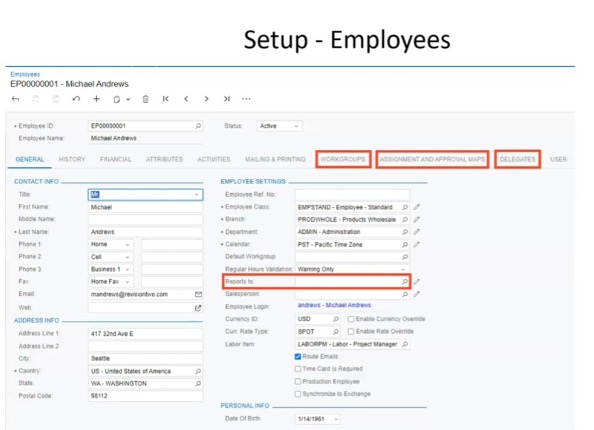
Before you can route approvals intelligently, Acumatica needs to understand your organizational structure. Every person who will submit or approve documents needs to be set up as an employee (separate from their user login, though they’ll need both).
The key field is the “Reports To” relationship. This creates your organizational hierarchy. Set up a rule like “any purchase requisition over $5,000 needs approval from the employee’s direct manager,” and Acumatica automatically knows who that is.
Work groups solve a different problem. Sometimes you need functional approval from a specific department. Create groups like “Finance Team,” “Quality Management,” or “Sales Leadership” and assign relevant employees to each. When an approval goes to a work group, any member can approve it, preventing bottlenecks when someone is out.
Here’s a feature that solves a huge pain point: automatic delegation. In the employee record, specify a delegate and date range. During that period, all approval requests automatically route to their delegate instead. No more approvals sitting in limbo.
Building Approval Maps with Conditional Logic
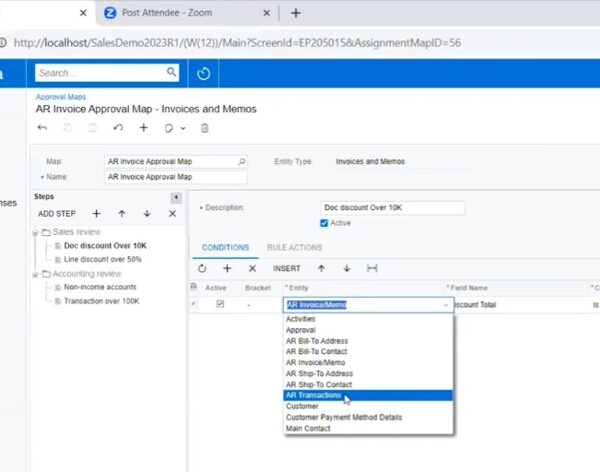
The real power comes from how flexible the routing logic can be. You build this in “Approval Maps” that define the rules for each document type.
Let’s say you want AP invoice routing with these rules:
- If discount over $10,000, sales leadership reviews it
- If discount percentage exceeds 50%, CFO also approves
- After sales review, accounting does final approval
You’d set this up as an approval map with two steps:
Step 1: Sales Review
- Rule A: If discount total > $10,000, route to Sales Manager
- Rule B: If discount percent > 50%, also route to CFO
- On approval: Proceed to next step
Step 2: Accounting Review
- Route to Finance Department work group
- On approval: Document is approved
The beauty here is conditional logic. Not every invoice goes through this. Only ones meeting your criteria. A standard invoice with no unusual discounts bypasses these steps entirely.
For each approval step, you have multiple routing options: specific employee, work group, employee by filter, or document-based assignment (pulls the approver from document data, like “route to the employee who owns this customer account”). One manufacturer we work with uses document-based assignment for RMA approvals so credit memos automatically route to the sales rep who owns that customer relationship.
Real-World Example: Journal Transaction Approval
Let’s set up a journal transaction approval map with two safeguards:
Rule 1: Dollar Amount Threshold – If the transaction exceeds $5,000, the CEO must approve it before release.
Rule 2: Control Account Protection – If any line posts to a control account (like tax payable or AR/AP control accounts), all Finance Department members must review it.
When you save the journal transaction and remove the hold, Acumatica evaluates both rules. Transaction is $6,000? CEO gets notified. CEO approves? System checks for control accounts. Control account detected? Finance team gets the approval request. Once approved, it’s ready to release.
The person who entered the transaction can see approval status on the document’s “Approvals” tab showing which steps are pending, who needs to act, and the complete approval history.
Notifications and the Mobile Experience
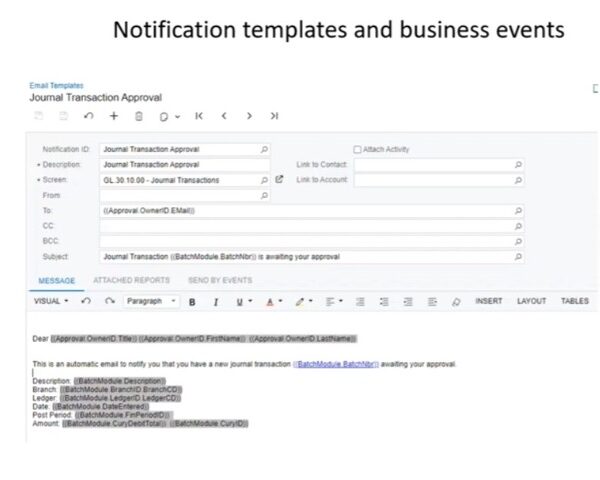
Acumatica approval workflows are only effective if approvers know they have something waiting. When you configure an approval map, you specify a notification template that determines who receives the notification, how they receive it (email, mobile push, SMS, or Teams integration), and what’s included.
Most clients use email notifications with embedded links. The approver gets an email like “Journal Transaction #JT000123 requires your approval” with a button that takes them directly to that transaction. One click to open, one click to approve.
For executives who live in their mobile devices, the Acumatica mobile app supports approval notifications as push alerts. They can review and approve right from their phone without opening a laptop.
From the approver’s perspective, it’s straightforward. Log into Acumatica, navigate to the “Approvals” screen, filter by work group or personal approvals, click into a document to review details, and approve or reject with a single button. If rejection reasons are enabled, the system prompts them to explain why, creating an audit trail.
Why This Matters: Compliance and Time Savings
Beyond speeding up processes, approval workflows create a complete audit trail. Every approval decision is logged with approver name, timestamp, approval/rejection status, any notes provided, and the step that triggered the requirement.
For manufacturers dealing with ISO compliance, FDA regulations, or SOX controls, this documentation is invaluable. One client in plastics molding faced an external audit last year. Because all their AP invoice approvals flowed through Acumatica, they instantly produced reports showing every invoice over $10,000 had been reviewed by their CFO. The whole process took 15 minutes instead of days digging through email trails.
Common Implementation Patterns
After helping dozens of manufacturers implement approval workflows, we’ve seen some patterns:
- Start with AP Bills – Route invoices based on GL account, department, or dollar threshold. Highest ROI and immediate time savings.
- Layer in Purchase Requisitions – Control spending before it becomes a committed PO with tiered approval levels based on dollar amounts.
- Add Sales Order Approvals – Require manager approval for large orders, high discounts, or new customers. Catches potential issues before they become AR headaches.
- Implement RMA/Credit Memo Controls – Escalating approval requirements as credit amounts increase, with automatic routing to sales management.
You don’t have to implement everything at once. Most clients start with one or two document types, get comfortable with the configuration, and expand from there.
What This Means for Your Team
Total time from invoice entry to approval: usually under 24 hours, even for complex invoices requiring multiple sign-offs.
No more printing. No more hunting people down. No more invoices sitting in vacation auto-reply purgatory.
That’s the real value of approval workflows. It’s about giving your team back their time to focus on actual accounting work instead of approval logistics.
At Parallel Solutions, we’ve helped dozens of manufacturers implement approval workflows that eliminate bottlenecks and create proper controls. Our team knows the ins and outs of configuring approval maps, setting up work groups, and building workflows that match how your business operates. Whether you’re looking to automate AP invoice approvals, add controls to purchase requisitions, or route sales orders based on discount levels, we can help you get it configured right the first time.
Want to see how approval workflows could work for your specific processes? Give us a call at (440) 498-9920 or email us at sales@parallelsolutions4u.com. We’re happy to walk through your approval requirements and show you exactly how Acumatica can automate them.