

Published: July 2026 | By Jeff Ballway, Senior Strategic Solutions Consultant
Key Takeaways
- Acumatica multiple production clock entry was introduced in Acumatica 2022 R2.
- The feature allows employees to clock into multiple production orders simultaneously and receive automatic, real-time labor distribution across all active jobs.
- Work center configuration is required before the feature becomes active at any station.
- Labor distributed automatically by Acumatica feeds directly into job costing, improving data accuracy and reporting reliability across your entire manufacturing operation.
One of the most common complaints I hear from shop floor supervisors is how much time gets eaten up fixing labor records after the fact. An employee clocks in on one job, spends half their shift bouncing between two or three others, and by the end of the day someone has to go back and manually redistribute that time across every production order. It sounds like a minor inconvenience until you realize it’s happening every day, across every shift, for every operator on the floor.
Acumatica addressed this problem directly when they released the Acumatica multiple production clock entry screen, and it’s one of those features that manufacturing clients immediately understand the value of the moment they see it.
The Problem with Single-Job Clock Entry

Before this feature existed, the standard clock entry screen worked fine for employees who stayed on one job at a time. But in most manufacturing environments, that’s not how the floor actually operates. Workers move between jobs, cover for each other, and split their time across multiple production orders throughout the day.
When that happened, the workaround was tedious. A supervisor or data entry person had to manually reduce the labor on the job the employee was clocked into, then add that time to the other jobs they worked on. It was extra administrative work built into a process that was supposed to eliminate extra administrative work. The Acumatica multiple production clock entry screen removes that workaround entirely.
How the Acumatica Multiple Production Clock Entry Screen Works
The new screen will look familiar to anyone who has used the standard clock entry screen. Employees can scan their badge or select their user ID the same way they always have. The difference is what happens next.
From the clock entries tab, an employee can select multiple production orders and operations at the same time. Once they click clock in, the system is tracking time across all of those jobs simultaneously. When they’re ready to clock out, they can clock out of all jobs at once or off individual jobs one at a time depending on what they finished.
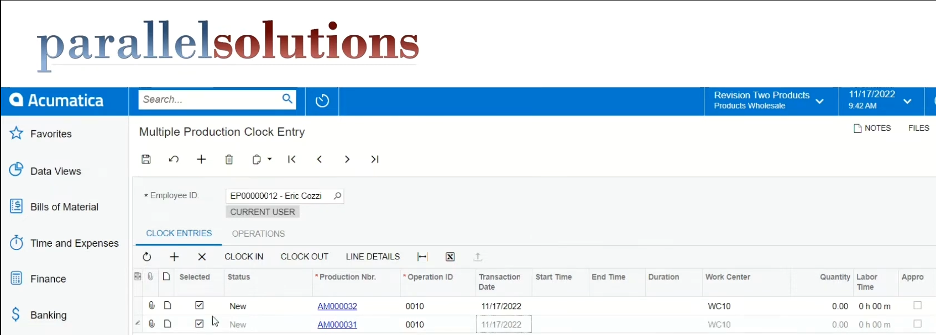
The core accuracy benefit of Acumatica multiple production clock entry is automatic, real-time labor distribution. If someone worked two jobs for two minutes, the system creates one minute of labor on each production record without manual calculation. That distribution happens based on which jobs were active at each point during the shift.
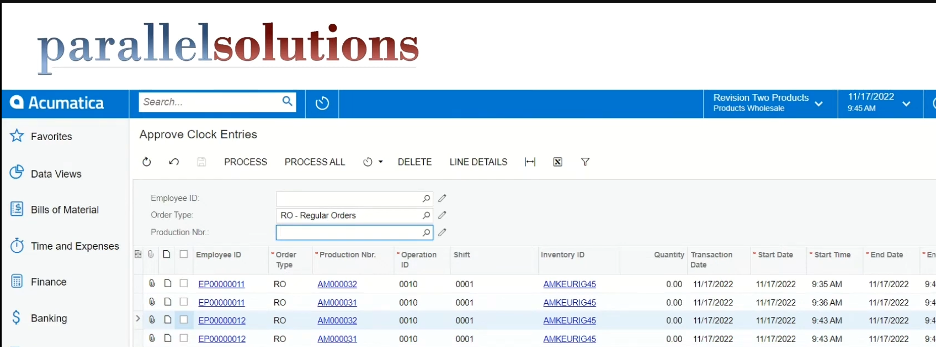
The screen also includes a notification that catches entries under one minute, which addresses an issue from previous versions where those entries were simply dropped. Now users have the option to round up to one minute, since that is the smallest increment, the system can record. This notification prevents labor from disappearing undetected, which was a known issue in earlier versions of the clock entry screen.
Browsing Open Operations on the Floor
There is a second way employees can use this screen that works well in busier environments. Instead of scanning or manually selecting each production order, employees can view a list of all open operations that have been released to the floor and select from there.
This view also supports filters, which is genuinely useful if your facility has terminals set up at specific work centers. A terminal at work center 10, for example, can be configured to display only the operations available at that work center. The employee sees exactly what is relevant to their station and nothing else, which keeps things simple and reduces the chance of clocking into the wrong job.
After selecting from that list, the system populates the clock entries tab automatically with everything they selected, and from there the process works the same way.
Setting Up Acumatica Multiple Production Clock Entry on Your Work Centers
Acumatica multiple production clock entry must be enabled individually on each work center where you want the feature active. It does not turn on automatically after upgrading to 2022 R2. To configure it, open the work center settings in Acumatica’s manufacturing module and enable clock entry for multiple production orders. Once enabled, employees at that work center can begin using the new screen alongside the standard single-job clock entry screen, which remains available for situations where single-job tracking still makes more sense.
This is straightforward to do in Acumatica’s work center configuration, but it is easy to overlook during initial setup.
What This Means for Labor Accuracy

Accurate labor reporting directly affects job costing accuracy in Acumatica. When labor is manually redistributed after a shift, delays and human error introduce inaccuracies into production order costs before they roll up into job costing totals. When Acumatica distributes labor automatically in real time, production order costs reflect actual labor as it happens, which produces more accurate job costing data for pricing decisions, profitability analysis, and operational efficiency reporting.
We’ve walked clients through this feature as part of demos and implementations, and the reaction is usually the same: it solves a problem they’ve been working around for so long that they stopped thinking of it as a problem. Once they see what accurate, automatic labor distribution looks like, going back to manual adjustments stops feeling like an option.
If your team is spending part of every shift cleaning up clock entry data, let’s talk about whether Acumatica’s multiple production clock entry screen makes sense for your operation. Contact Parallel Solutions to see what it looks like on your floor.
Read Next: Acumatica Manufacturing Edition: Built for the Shop Floor
Frequently Asked Questions: Acumatica Multiple Production Clock Entry
What is Acumatica multiple production clock entry?
Acumatica multiple production clock entry is a shop floor feature introduced in Acumatica 2022 R2 that allows employees to clock into more than one production order at the same time. The system automatically calculates and distributes labor time across all active jobs in real time, eliminating the need for manual redistribution after the shift.
Which Acumatica version introduced multiple production clock entry?
The multiple production clock entry screen was released in Acumatica 2022 R2 as part of the Acumatica Manufacturing Edition.
Does Acumatica multiple production clock entry require configuration before use?
Yes. Each work center where you want to allow multiple concurrent clock entries must be individually configured with the setting enabled. The feature does not activate automatically after upgrading. Once enabled at a work center, it is available immediately alongside the standard single-job clock entry screen.
Parallel Solutions is an Acumatica Cloud ERP implementation partner specializing in manufacturing and distribution businesses. Based in Warrensville Heights, Ohio, Parallel has helped manufacturers reduce manual labor tracking errors and improve job costing accuracy with Acumatica’s manufacturing suite since 1995. Learn more at parallelsolutions4u.com