

Last updated: August 2026
We hosted our quarterly Acumatica user group last month and it pulled the biggest turnout we’ve ever had. It’s not hard to see why, the topic was AI. Everyone running Acumatica has heard the AI promises, but it seems that few people are really using all that it offers.
Our own Laura Jaffe, an Acumatica MVP and Senior Consultant here at Parallel Solutions, walked through a live demo of Acumatica AI Studio and the AI Assistant that runs on top of it. What she showed wasn’t a polished sales reel; it was the actual interface. She answered actual questions and showed how the software did exactly what you hoped, and a few times where it still required some user input. That mix is worth sharing, because it’s the honest version of where this technology stands right now.
What Is Acumatica AI Studio, and How Is It Different from the AI Assistant?
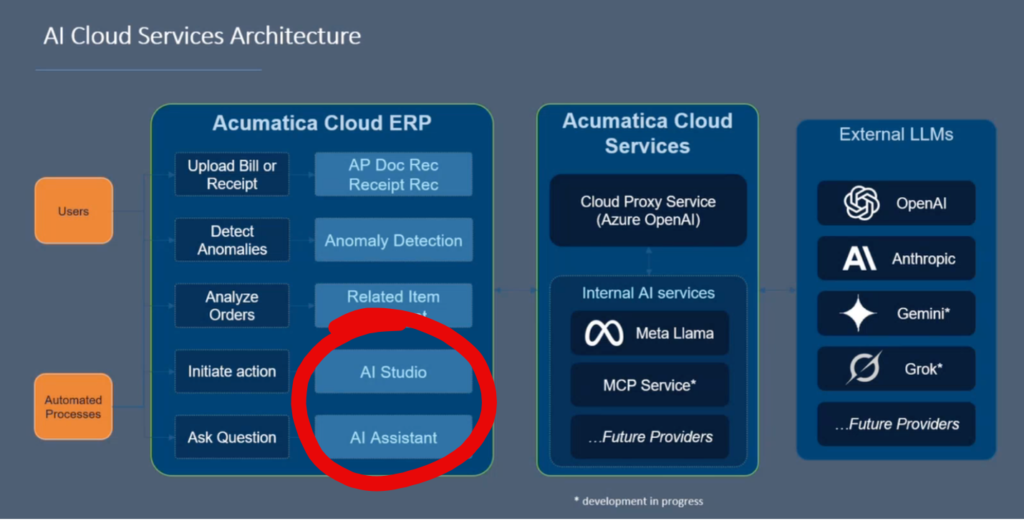
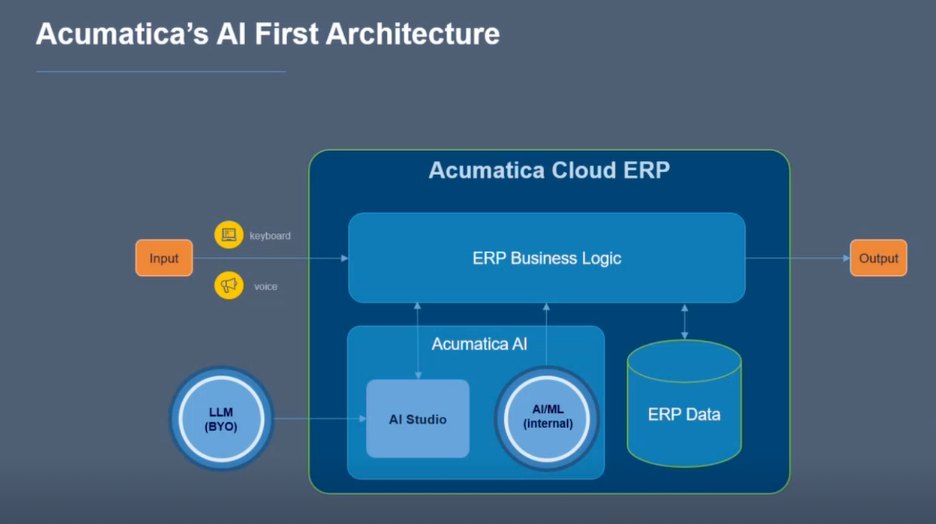
Acumatica AI Studio is the configuration layer where your team connects Acumatica to a large language model and sets up how AI features behave inside your system. It’s where prompts get built, where anomaly detection gets configured, and where the connections between your ERP data and an outside AI model get established.
The AI Assistant is what your users see and interact with day to day. It’s the chat-style interface inside Acumatica where someone can type a question in plain English, like “show me this month’s overdue invoices by customer,” and get an answer without writing a report or building a generic inquiry from scratch.
Think of AI Studio as the workshop and the AI Assistant as the tool that comes out of it. One is for administrators setting things up. The other is for the person on the plant floor or in the back office who just wants an answer.
Asking Your ERP a Question in Plain English
Let’s take a look at how the AI Assistant handles exactly the kind of question a controller or plant manager asks, not a scripted example built to look impressive. That’s the point of a natural language interface. You’re not learning query syntax or digging through a menu of pre-built reports. You type the question the way you’d ask a coworker, and Acumatica does the work of translating that into a real answer pulled from your data.
Acumatica has been public about its approach to AI, and it’s a reasonable one: keep it practical, keep your data secure, and make sure the output adds value instead of just looking impressive in a demo. You can see that philosophy laid out directly on Acumatica’s own AI resource page. The framing matters, because plenty of manufacturers have been burned by AI features that generate a confident-sounding answer that’s wrong. What stands out is that the Assistant’s answers were traceable back to actual Acumatica data, not a black box.
What Happens When AI Studio Builds You a Dashboard
Here’s where it gets interesting. When we asked the AI Assistant to turn a query into a pivot table, it handled some of these requests automatically, generating the pivot and offering to drop it straight onto a dashboard. That’s the ideal outcome: ask a question, get a visual, done.
But it doesn’t always work that cleanly yet. In at least one case during the demo, instead of building the pivot itself, the Assistant gave step-by-step directions for how to build it manually using the data it had already pulled together. We want to be straightforward about this – the feature is still developing, and Acumatica is continuing to expand what it can build directly versus what it can only point you toward.
That’s not a knock on the tool. It’s a realistic snapshot of a feature that’s actively being built out release by release, and it tells you something useful: don’t assume every AI-generated output is fully automated yet. Some of it is genuinely hands-off. Some of it still hands the keyboard back to you with better instructions than you had before.
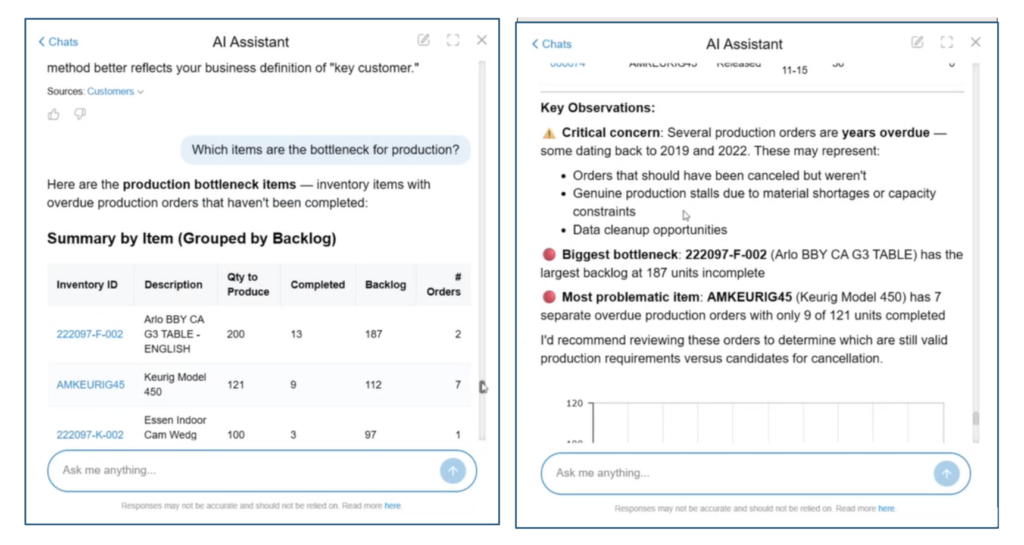
Here are a couple screenshots from the demo. Laura asked which items are the bottlenecks for production and the AI assistant came back with a summary and some key observations.
Where AI Studio Still Needs a Human in the Loop
One of the options that appears in the AI Studio setup screen is the “clear cloud data before processing” option. What is that? It relates to the metadata Acumatica ingests to generate AI descriptions of your data, like column and field descriptions, not the underlying transactional data itself. If you’ve made significant changes to your data structure, that’s the kind of setting you’d revisit. People should have real, specific questions about how their data moves through these AI tools, and that’s exactly the right instinct. AI Studio and the AI Assistant are useful precisely because they’re built inside Acumatica’s existing security framework, not bolted on from outside. But “built in” doesn’t mean “set it and forget it.” Someone on your team should understand what’s being sent where, especially before rolling these tools out broadly.
Getting Started with AI Studio at Your Company
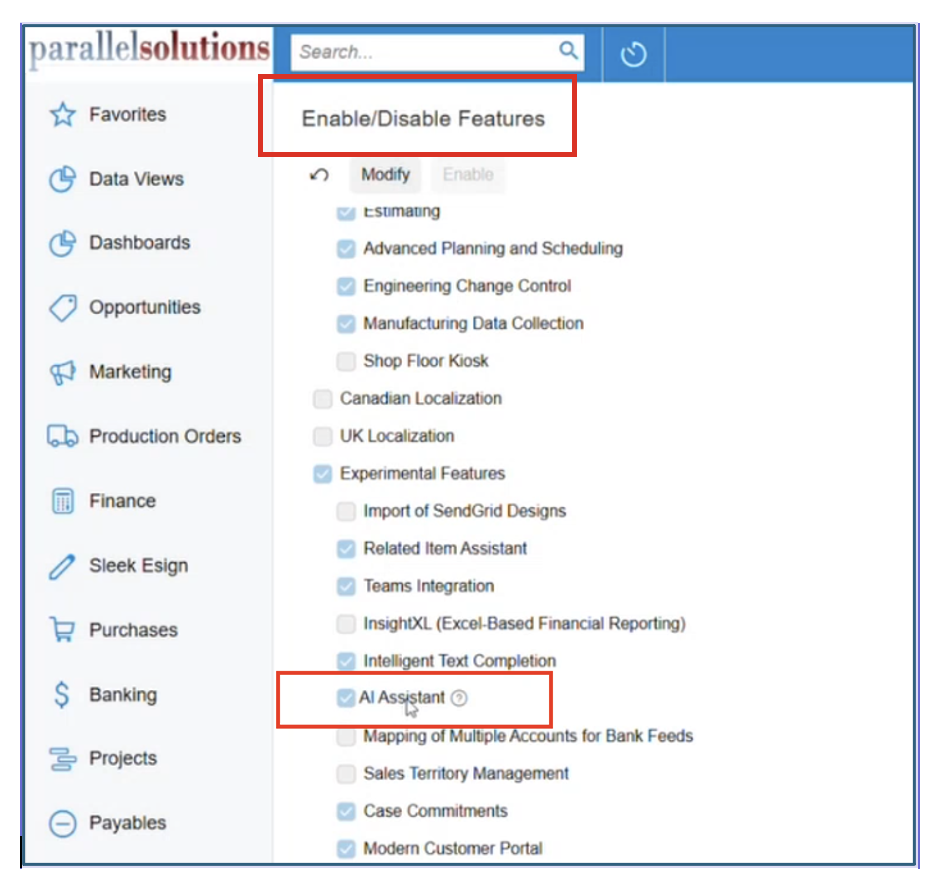
Here are two practical requirements before your team can use these tools. First, AI Studio and the AI Assistant only work with Acumatica’s modern UI, not the classic interface. If you haven’t switched over yet, this is one more reason to prioritize it, especially since the classic UI is being phased out entirely in the 2026 R2 release. Second, not every AI feature is included on every license. Depending on your edition and how long you’ve been on Acumatica, you may need to review what’s included before you can turn these features on.
Neither of these requirements should be a roadblock for you. Most manufacturers we work with are already planning their move to the modern UI, and licensing questions are usually a quick conversation once we know what you’re running. Our Acumatica implementation team can review your current edition and tell you exactly what’s already available.
Frequently Asked Questions
What is Acumatica AI Studio used for?
Acumatica AI Studio is where administrators configure AI features inside Acumatica, including connecting the system to a large language model, building prompts, and setting up tools like anomaly detection. It’s the setup layer behind the AI Assistant.
Does Acumatica AI Studio work with the classic UI?
No. AI Studio and the AI Assistant currently require Acumatica’s modern UI. The classic UI is being phased out in the 2026 R2 release, so every Acumatica customer will eventually move to the modern interface regardless.
Is Acumatica AI Studio available on every license edition?
Not necessarily. Some AI features are limited to newer license editions. If you’ve been on Acumatica for a while, it’s worth checking with your implementation partner to see what’s included in your current agreement.
Can the Acumatica AI Assistant build dashboards automatically?
Sometimes. In some cases, the AI Assistant can generate a pivot table and add it directly to a dashboard. In others, it provides step-by-step instructions for building the output manually. This is an area Acumatica continues to expand.
Is my data secure when I use Acumatica’s AI features?
Acumatica has stated that data privacy and security are core to its AI approach, and AI Studio includes settings like anonymization tags for sensitive fields sent to an outside LLM. Manufacturers should still understand what data is being processed and where before rolling AI tools out company wide.
See Acumatica AI Studio in Action
Watching this feature in a live demo makes it a lot easier to gauge than reading a feature list. If you want to see what AI Studio and the AI Assistant can do with your own Acumatica data, schedule a quick conversation with our team. We can walk through what’s available on your edition and what to expect from these tools right now.
Read next:
Curious whether your Acumatica license already includes these AI features, or what it takes to upgrade? We’re covering that in an upcoming post on Acumatica AI licensing. In the meantime, browse more posts on our Parallel Solutions blog.
Parallel Solutions is an Acumatica Cloud ERP implementation partner serving manufacturers and distributors across Greater Cleveland and nationally. Our team, including Acumatica MVP Laura Jaffe, hosts regular user group sessions to help customers get more out of the AI features already available in their software.