

Key Takeaways
|
Every manufacturer we talk to about Acumatica’s AI features eventually asks some version of the same question: where does my data actually go? It’s the right question, and it deserves a straight answer instead of a vague reassurance that “it’s secure.”
The short version is that Acumatica built its AI features to work inside the security model you already trust, not as a separate tool bolted on from outside. But “built in” isn’t the same as “no action required.” Here’s what actually happens to your data, field by field, so you can make an informed decision instead of guessing.
Why Data Privacy Is the First Question to Ask About Any ERP AI Feature
AI features in any ERP system generally work by sending some amount of your data to a large language model, either one hosted by the ERP vendor or a third-party provider like OpenAI or Microsoft. That’s true whether the feature is Acumatica’s AI Assistant answering a question, an anomaly detection tool flagging unusual pricing, or a document recognition feature reading a vendor invoice.
None of that is inherently a problem. But it does mean the right first question isn’t “is AI safe?” in the abstract. It’s “what data does this specific feature send, and where does it go?” Every AI feature has a different answer, and a responsible ERP partner should be able to tell you what that answer is before you turn a feature on.
What Data Actually Gets Sent to an AI Model When You Use Acumatica AI
Acumatica’s AI features are scoped to the task at hand. When you ask the AI Assistant a question in plain English, it sends the query itself along with the relevant data needed to answer it, not your entire database. When AI Studio generates descriptions of your data structure to make natural language queries possible, it works from metadata like field and column names and descriptions, not the underlying transactional records those fields contain.
This distinction matters more than it might seem. Metadata tells an AI model that a field called “CustomerName” holds customer names. It doesn’t hand over your actual customer list in the process. Understanding which category a given AI feature falls into, metadata-level or transaction-level, is the first thing to check before adopting any new AI tool inside Acumatica.
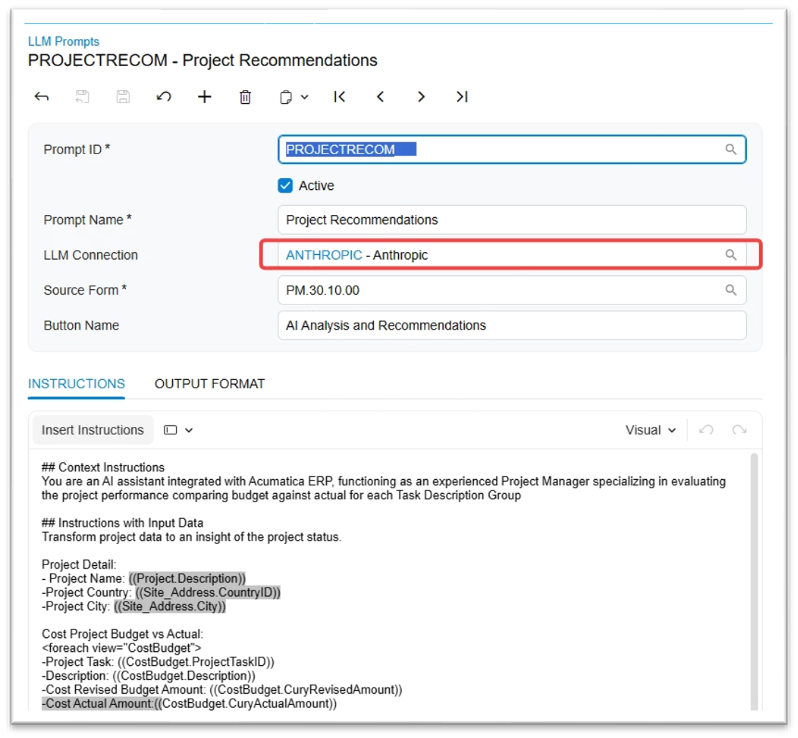
How Anonymization Tags Protect Sensitive Fields Like Customer Names
For AI Studio prompts that do pull real data, like a natural language query pulling actual customer records, Acumatica includes anonymization tags. These let you flag specific fields, such as customer names, contact details, or other sensitive identifiers, to be masked before that data is sent to an outside AI model. The AI still processes the structure and pattern of the data, but the sensitive values themselves are hidden.
This is a meaningful control, but it’s not automatic. Someone building a prompt in AI Studio has to actually apply the anonymization tag to the fields that need it. If your team is building custom AI Studio prompts, this is exactly the kind of setting worth reviewing together with whoever configured it, rather than assuming it happened by default.
What the “Clear Cloud Data” Setting Actually Controls
 If you’ve poked around AI Studio’s settings, you may have noticed an option to clear cloud data before processing. It’s easy to assume this controls whether your business data as a whole gets sent to the cloud, which understandably makes people nervous. In practice, it’s narrower than that. This setting relates to the metadata Acumatica has already generated to power AI descriptions of your data, things like field and table descriptions used to make natural language queries work.
If you’ve made significant changes to your data structure since AI features were first configured, clearing that cached metadata and letting Acumatica regenerate it ensures the AI Assistant is working from current information. It’s a maintenance setting, not a privacy switch for your transactional data. Knowing the difference prevents both unnecessary alarm and false confidence.
Why AI Features Run Inside Acumatica’s Existing Security Framework
One detail worth understanding is that Acumatica didn’t build a separate security model just for AI. These features operate within the same role-based permissions and data access rules already governing the rest of your Acumatica instance. If a user doesn’t have access to see certain financial data inside Acumatica, that restriction doesn’t disappear when they use the AI Assistant.
That’s a meaningfully different approach than bolting a generic AI chatbot on top of your ERP with its own separate access rules. It means your existing security investment, the permissions structure you’ve already spent time getting right, carries over to how AI behaves too.
Questions to Ask Before You Turn AI Features On Company-Wide
A few questions are worth answering before rolling any Acumatica AI feature out beyond a small pilot group. What data does this specific feature access, metadata or transactional records? Are there sensitive fields that should be anonymized before they reach an AI model? Who on your team is responsible for reviewing AI Studio configurations as new features get added? And has anyone actually read Acumatica’s documentation on data handling for the specific feature you’re about to use, rather than assuming it works the same way as the last one?
None of these questions should slow down adoption. They’re the same due diligence most manufacturers already apply to any new software connection, and Acumatica’s AI features hold up well under that scrutiny. The goal is simply to make sure someone on your team can answer them with confidence before AI becomes part of everyone’s daily workflow.
Frequently Asked Questions
Does Acumatica send my full database to an AI model?
No. Acumatica’s AI features are scoped to the task at hand. They send the specific data or metadata relevant to that feature, not your entire database.
What is an anonymization tag in Acumatica AI Studio?
An anonymization tag lets you flag sensitive fields, like customer names or contact information, so that data is masked before it’s sent to an outside AI model when building an AI Studio prompt.
What does the “clear cloud data before processing” setting do in Acumatica?
It clears cached metadata Acumatica uses to generate AI descriptions of your data structure, such as field and table descriptions. It does not affect your underlying transactional records.
Do Acumatica’s AI features follow the same security permissions as the rest of the system?
Yes. AI features operate within Acumatica’s existing role-based permissions and data access rules rather than using a separate security model.
What should I check before rolling out Acumatica AI features company-wide?
Confirm what data each specific feature accesses, whether sensitive fields need anonymization tags, and who on your team owns reviewing AI Studio configurations as new features are added.
Get a Straight Answer About Your Acumatica AI Setup
If you’re weighing whether to turn on a specific Acumatica AI feature, or you want a second set of eyes on how your existing AI Studio prompts are configured, reach out to our team. We can walk through exactly what data a given feature touches and help you configure it with confidence.
Read next:
Curious what Acumatica AI Studio and the AI Assistant can actually do day to day? Read our post, What Is Acumatica AI Studio? A Practical Look at What It Can Do Today, for a closer look.
Read Acumatica’s statement on Trust and Security for Acumatica AI
Parallel Solutions is an Acumatica Cloud ERP implementation partner serving manufacturers and distributors across Greater Cleveland and nationally. Our team helps clients understand and configure the AI features already available in their Acumatica environment