

Key Takeaways ● MCP (Model Context Protocol) is a standardized way for outside AI tools to connect to and work with data from systems like Acumatica. ● Instead of building a custom, one-off connection for every AI tool, MCP gives developers a common language that any compatible AI application can use. ● Both community-built, open-source MCP servers and commercial options are starting to appear for Acumatica. ● MCP is still an emerging piece of the AI landscape. Most manufacturers don’t need to act on it today, but it’s worth understanding before it becomes standard vocabulary in ERP circles. ● The features already inside Acumatica, like the AI Assistant and AI Studio, don’t require MCP. It’s a separate, additional way to connect AI tools that sit outside Acumatica itself. |
If you’ve spent any time in AI or software development circles lately, you may have run into a term that sounds more like a network protocol than anything related to your ERP system: MCP, short for Model Context Protocol. It hasn’t reached mainstream ERP vocabulary yet, but it’s worth understanding now, before it does.
MCP isn’t a feature you’ll find inside Acumatica’s standard interface, and it isn’t something most manufacturers need to act on today. It’s a newer approach to connecting AI tools to business systems, and it’s showing up in the Acumatica ecosystem. Here’s what you need to know, in plain terms.
What Is MCP, and Why Is Everyone Suddenly Talking About It?
Model Context Protocol is an open standard for connecting AI applications, like an AI assistant or a large language model, to outside data sources and tools. Before MCP, if a developer wanted an AI tool to work with data from a specific system, they typically had to build a custom, one-off connection for that exact combination of AI tool and data source. Every new pairing meant starting from scratch.
MCP changes that by giving developers a common language. An AI tool that supports MCP can connect to any data source that also supports MCP, without a custom integration built specifically for that pairing. That’s the reason it’s generating so much conversation across the software industry right now. It’s less about any single flashy feature and more about removing a repetitive integration problem that’s slowed AI adoption everywhere, not just in ERP.
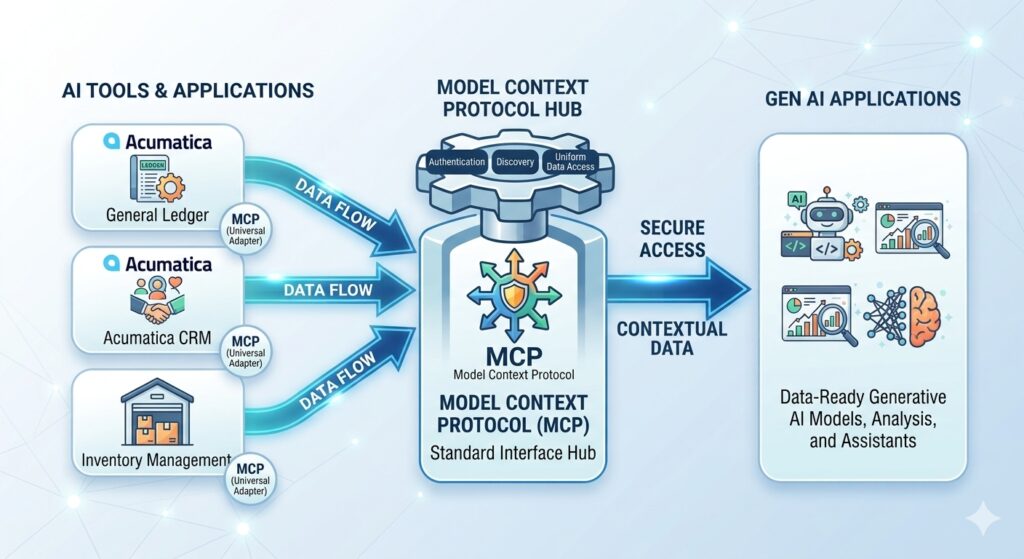
How MCP Connects Acumatica to Outside AI Tools
Applied to Acumatica, MCP works through something called an MCP server, a piece of software that translates between Acumatica’s data and any AI tool that speaks the MCP standard. Instead of an AI assistant needing custom-built access to your Acumatica database, it can connect through an MCP server that already knows how to present Acumatica data in a way the AI tool understands.
In practical terms, this could eventually let manufacturers connect Acumatica data to a wider range of AI tools, beyond what’s built into Acumatica itself, without a developer building a custom bridge for each one. That’s the promise. Whether it delivers on that promise at scale is still playing out.
Open-Source vs. Commercial MCP Servers for Acumatica
Right now, there are two general paths for an MCP server connected to Acumatica. The first is a community-built, open-source option, the kind of project a developer publishes on a platform like GitHub for anyone to use, inspect, or contribute to. These tend to move quickly and reflect what the developer community finds useful, but they typically come with less formal support and no guarantee of long-term maintenance.
The second path is a commercial MCP server, built and supported by a vendor with a business reason to keep it maintained, documented, and secure. For a manufacturer evaluating whether to use either option, the questions are similar to evaluating any third-party integration: who maintains it, how is data handled as it passes through, and what happens if the maintainer stops updating it.
What MCP Could Mean for Manufacturers Down the Road
The honest answer is that most manufacturers running Acumatica don’t need an MCP server today. The AI Assistant and AI Studio already built into Acumatica cover the natural language queries, dashboard building, and anomaly detection most companies are looking for, and they don’t require MCP at all.
Where MCP could eventually matter is for companies with more specialized AI needs, connecting Acumatica data to an internal AI tool, a custom-built application, or a specific AI platform your company has standardized on for reasons unrelated to Acumatica. As MCP matures and more AI tools adopt it as a standard, that kind of connection is likely to get considerably easier to set up than it is today.
Should You Be Looking at MCP Right Now?
For most Acumatica users, the right move today is awareness, not action. Know that MCP exists, understand roughly what problem it solves, and keep it in mind as a term you’ll likely hear more often as AI tools and ERP systems continue connecting to each other in new ways.
If your company already has a specific need to connect Acumatica data to an outside AI tool that isn’t covered by the AI Assistant or AI Studio, that’s a good reason to look at MCP options more closely now rather than later. For everyone else, it’s a trend worth watching rather than a project worth starting this quarter.
Frequently Asked Questions
What does MCP stand for?
MCP stands for Model Context Protocol, an open standard for connecting AI applications to outside data sources and tools.
Does Acumatica have built-in MCP support?
Acumatica’s core AI features, the AI Assistant and AI Studio, don’t require MCP. MCP servers connecting to Acumatica are emerging separately, through both community-built and commercial options.
Do I need to set up MCP to use AI features in Acumatica?
No. MCP is a separate, additional way to connect outside AI tools to Acumatica data. The AI Assistant and AI Studio work without it.
What’s the difference between an open-source and commercial MCP server?
An open-source MCP server is typically built and maintained by the developer community with no formal support guarantee. A commercial MCP server is built and supported by a vendor with an ongoing business reason to maintain it.
Should manufacturers using Acumatica start using MCP now?
Most manufacturers don’t need to act on MCP today, since Acumatica’s built-in AI features already cover common use cases. Companies with a specific need to connect Acumatica to an outside AI tool may want to evaluate MCP options sooner.
Talk Through Your Acumatica AI Options
Whether you’re trying to get more out of the AI features already built into Acumatica or you have a specific integration need that might call for something like MCP, our team can help you figure out the right path.
Read next:
Not sure what Acumatica’s built-in AI can already do? Start with What Is Acumatica AI Studio? A Practical Look at What It Can Do Today before deciding whether you need anything beyond it.
Parallel Solutions is an Acumatica Cloud ERP implementation partner serving manufacturers and distributors across Greater Cleveland and nationally. Our team helps clients evaluate both built-in and emerging AI options for their Acumatica environment.