

Last updated: October 2026
Key Takeaways
|
“Can we use the new AI features with what we already have?” Controllers and IT leads ask Parallel Solutions this almost every week. Acumatica AI license requirements depend on four things:
- Your edition
- Your version
- Whether you run Modern UI
- What is on your subscription
AI Studio needs the Select, Prime, or Enterprise edition, version 2025 R2 or later, Modern UI, and an AI Studio license. AI Assistant needs version 2026 R1 or later and has to be added to your subscription.
Plenty of Acumatica Cloud ERP customers already meet most of these requirements without realizing it. Others are one upgrade or subscription change away.
Learn more if your business is ready: Download the AI Readiness Evaluation Checklist.

What Are the Acumatica AI License Requirements for Each Feature?
Acumatica AI license requirements are the edition, version, interface, and subscription conditions a company must meet before a given AI feature will run. The table below compares the requirements for the two AI capabilities Parallel clients ask about most: AI Studio (which includes AI Automation and Anomaly Detection) and AI Assistant.
Requirement | AI Studio | AI Assistant |
Minimum version | 2025 R2 | 2026 R1 |
Edition | Select, Prime, or Enterprise (not Essentials or prior product lines) | Confirm with your partner or CSM |
User interface | Modern UI required | Modern UI (the only option from 2026 R2 forward) |
How you get it | Instance must be licensed for AI Studio | Added to your subscription by your partner or CSM |
Usage costs | Third-party LLM access is billed separately | Monthly AI Unit allocation; extra units available for purchase |
Source: Acumatica Community FAQs for AI Studio
Not every AI-related feature in Acumatica carries these requirements. Built-in machine learning tools such as AP Document Recognition and Intelligent Text Completion have been in the platform for several releases, and AP Document Recognition includes 50 pages per month at no additional cost.
Does Acumatica AI Studio Work on the Classic UI?
No. Acumatica AI Studio runs only on Modern UI, so a company still on Classic UI cannot use it, regardless of edition or license. Acumatica’s own FAQ is explicit: customers need to be on Modern UI and on Select, Prime, or Enterprise.
Many longtime customers stayed on Classic UI because switching felt like a project nobody had time for. With 2026 R2, that is no longer an option.
What Does Acumatica 2026 R2 Change for Classic UI Users?
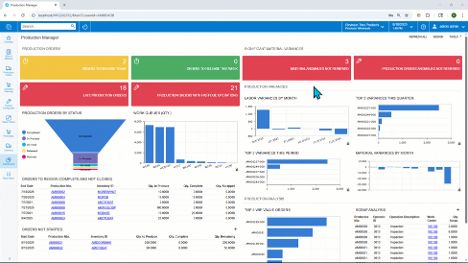
Acumatica 2026 R2, now generally available, is the release that retires Classic UI. According to Acumatica’s Classic UI deprecation announcement Modern UI cannot be turned off in 2026 R2, and Classic UI cannot be enabled “under any circumstances,” regardless of your support agreement.
The timeline has two steps. In 2026 R2, any custom screen without a Modern UI version still opens in Classic UI with a deprecation warning. Starting with 2027 R1, screens that exist only in Classic UI are no longer accessible. For companies with customizations, that second date is the real deadline.
The move to Modern UI is no longer a question of whether, only when. Companies that plan it now can schedule training, convert custom screens, and turn on AI Studio in one project instead of making the move under upgrade pressure.
How Do You Check Your Acumatica Edition and AI Readiness?
Checking AI readiness takes one conversation, not a full ERP review. What to check: these four items answer most AI licensing questions.
- Confirm whether you are on Select, Prime, or Enterprise. Essentials and prior product lines do not support AI Studio.
- AI Studio needs 2025 R2 or later. AI Assistant needs 2026 R1 or later.
- UI status. Confirm whether you run Modern UI today and list any custom screens that do not yet have a Modern UI version.
- Subscription add-ons. Confirm whether AI Studio or AI Assistant is on your subscription and what monthly AI Unit allocation applies. Administrators can track usage on the AI Unit Consumption (ML900000) screen.
If your partner has not raised any of this yet, that is worth noting. Edition requirements and the Classic UI timeline are exactly what a good implementation partner flags before clients have to ask.
What Should Manufacturers and Distributors Decide Before Upgrading for AI?
Before changing editions or adding AI to a subscription, define the specific jobs you want AI to do. “We want AI” gives your partner nothing to map against your contract. “We want anomaly detection flagging unusual purchase order costs” or “we want AI Assistant answering questions about open sales orders” does.
From there, ask for a side-by-side view: what you have today, what the specific features require, and how the Modern UI move fits your upgrade schedule. For manufacturers and distributors, combining the 2026 R2 upgrade, the Modern UI conversion, and AI setup into one plan usually means one round of user training instead of three.
The Bottom Line on Acumatica AI License Requirements
Acumatica AI license requirements come down to edition, version, Modern UI, and subscription. Because 2026 R2 makes Modern UI mandatory for everyone, most companies will clear the interface requirement as part of a normal upgrade. The remaining questions are about edition and subscription, and your partner can answer those quickly.
Frequently Asked Questions
Do all Acumatica editions include AI Studio?
No. AI Studio is available on the Select, Prime, and Enterprise editions. It is not available on Essentials or prior product lines, and the instance must be licensed for AI Studio.
Can I use Acumatica AI Studio on the Classic UI?
No. Acumatica AI Studio requires Modern UI. It does not run on the Classic UI in any version.
Is the Acumatica Classic UI still available?
Not in 2026 R2 or later. Classic UI remains in supported versions before 2026 R2 but receives no enhancements. Screens that exist only in Classic UI become inaccessible starting with 2027 R1.
Does Acumatica AI Assistant cost extra?
AI Assistant is added to your subscription through your partner or Acumatica Customer Success Manager. Usage is measured in AI Units with a monthly allocation, and additional units can be purchased. Acumatica pricing is quote-based, so your partner can confirm the cost for your account.
Which Acumatica version do I need for AI features?
AI Studio requires 2025 R2 or later, and AI Assistant requires 2026 R1 or later. Acumatica 2026 R2 adds MCP support, sensitive data masking, and AI Unit spending alerts.
Find Out What Your Acumatica Subscription Covers
See exactly which AI features your current edition and subscription support. Schedule a quick conversation with our team, and we will review your edition, version, and UI status and give you a clear plan for 2026 R2 and AI.
Read next: What Is Acumatica AI Studio? A Practical Look at What It Can Do Today
Parallel Solutions is an Acumatica Cloud ERP implementation partner and 2025 Acumatica Customer Success Award winner serving manufacturers and distributors across Greater Cleveland and nationally. Our team helps clients confirm edition requirements, plan Modern UI migrations, and put Acumatica AI features to work in their existing environment.