

Your production manager just received a customer order for 20 custom parts. Now what? Do you manually create production orders, chase down materials, coordinate with purchasing, track work-in-process, and somehow keep everything organized across spreadsheets and disconnected systems?
Or does your ERP system guide you through each step with built-in intelligence, real-time visibility, and automated workflows that ensure nothing falls through the cracks?
If you’re a manufacturer running on disconnected systems or legacy software, you know the daily struggle: production orders get lost in the shuffle; material shortages delay jobs, and manual processes create opportunities for costly errors. But what if your entire manufacturing workflow from sales order creation to customer delivery operated as smoothly as your production equipment itself? Acumatica’s Manufacturing Edition was built specifically to transform operational chaos into a seamless, efficient process.
Let’s walk through a complete manufacturing scenario in Acumatica to see how modern ERP transforms daily operations.
If you’d rather watch the process, check out our recorded video on YouTube.
The Starting Point: From Sales Order to Production Order
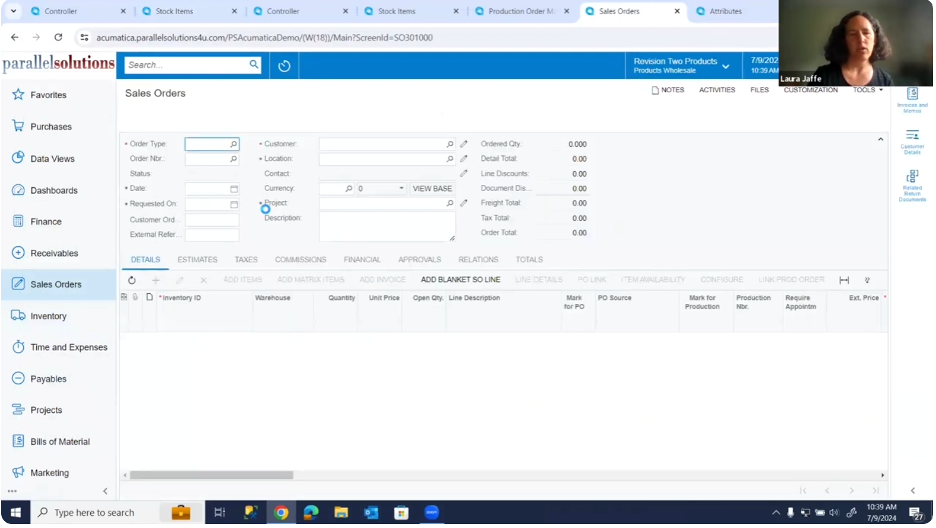
Sales Order Screen
The workflow begins where every manufacturing job should: with a confirmed customer order. In Acumatica, when you create a sales order, the system immediately shows you critical information, current inventory levels, lead times, and whether items need to be manufactured.
For manufactured items, you have two configuration options. You can set products up for make-to-stock (build inventory in advance) or make-to-order (manufacture specifically for customer orders). With make-to-order configuration, the system can automatically mark items for production and create linked production orders that maintain complete traceability from customer order through manufacturing and delivery.
Even if your items aren’t configured for automatic production order creation, you maintain complete flexibility. You can manually mark sales order lines for production when needed, then create the corresponding production order directly from the sales order or through your standard production planning process.
Creating and Releasing Production Orders
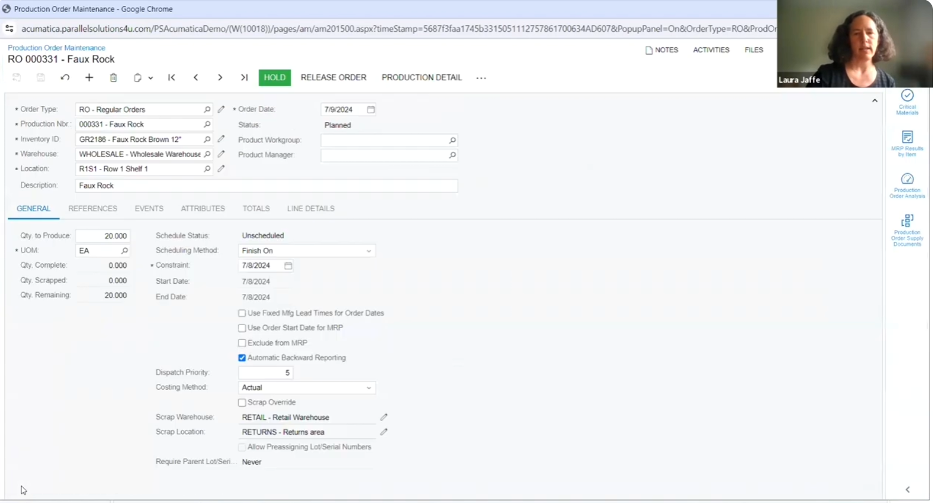
Once a production order is created, it immediately appears on the production manager’s dashboard no more lost paperwork or forgotten jobs. The production order automatically pulls all necessary information from your bill of materials, including the components needed, estimated labor time, tooling requirements, and projected costs.
This is where Acumatica’s flexibility really shines. Before releasing a production order, you can make real-time adjustments based on current conditions. Maybe a component isn’t available, so you substitute an alternative part. Perhaps you need to adjust quantities or modify the production routing. All of these changes happen within the system, maintaining complete audit trails and cost tracking.
When you release a production order, the system calculates your planned costs across all categories of materials, labor, and tools giving you a clear picture of expected expenses before production even begins. This planned cost becomes your baseline for monitoring actual performance and identifying variances that impact profitability.
The production order event log tracks every action taken, creating complete documentation of when orders were created, released, and progressed through each stage. This visibility proves invaluable for troubleshooting issues, analyzing cycle times, and demonstrating compliance with quality standards.
Materials Planning and Procurement Intelligence
One of the most powerful features in Acumatica’s manufacturing workflow is the critical materials check. With a single click, the system analyzes your production order against current inventory levels and immediately identifies any material shortages that could prevent production.
No more discovering halfway through a job that you’re missing a critical component. The system tells you upfront exactly what you need, letting you create purchase orders directly from the materials planning screen. You can select which items to purchase, choose vendors, and generate purchase orders all without leaving the production planning workflow.
For more comprehensive planning, Acumatica’s Material Requirements Planning (MRP) functionality looks across all production orders within a specified time window, identifying everything you need and suggesting whether to purchase, transfer from another location, or manufacture components. This enterprise-wide visibility ensures you’re always working with accurate, comprehensive information.
Intelligent Approval Workflows
When purchase orders are created, Acumatica’s configurable approval system automatically routes them based on your business rules. You might require approval for purchases over certain dollar amounts, specific item categories, or orders from particular vendors.
The approval engine is entirely rules-based and requires no programming. You configure the logic through the interface. You can set up multi-step approvals that flow either in parallel (multiple approvers simultaneously) or in sequence (one after another), ensuring that large or sensitive purchases receive appropriate oversight without creating bottlenecks.
The system guides users through the approval process visually, with recommended next steps highlighted in green. When a purchase order requires approval, the appropriate person is notified, and once approved, the order automatically progresses to the next stage in the workflow.
Production Operations and Material Management
When materials arrive and production is ready to begin, Acumatica supports sophisticated shop floor operations. You can release materials to production, which moves raw materials from inventory to work-in-process and begins tracking actual costs against your production order.
If you’re producing byproducts during manufacturing like scrap materials that can be recovered and resold, the system tracks these automatically based on your bill of materials setup. Operators can adjust byproduct quantities at the time of production, ensuring your inventory accurately reflects actual results rather than just estimates.
The system warns you when adjustments are made, creating visibility into variances while still allowing the flexibility needed on the shop floor. This balance between control and adaptability ensures that your inventory records stay accurate without creating rigid processes that don’t match real-world manufacturing conditions.
Tracking Production Progress with Move Transactions
As work progresses through your production operations, move transactions track the movement of finished goods through each operation and ultimately into inventory. If you have multi-step production processes, you can track work-in-process between operations, giving you real-time visibility into exactly where every job stands.
For manufacturers with serial number tracking requirements, you can associate serial numbers with products as they’re completed, ensuring complete traceability from raw materials through finished goods.
The system also handles partial completions intelligently. If you complete 15 units of a 20-piece order, you can record that progress immediately rather than waiting until the entire job is finished. This real-time recording ensures your inventory, costs, and production metrics always reflect current reality.
Cost Accounting and Production Order Completion
When production is finished, the production order moves to a completed status, but it doesn’t immediately close. This is a critical distinction in Acumatica’s workflow. The completed status allows your cost accountant to review the production order, verify that all material issues, labor charges, and overhead allocations are correctly recorded, and confirm that actual costs align with expectations.
Your accountant can review the production order totals, comparing planned costs to actual costs across materials, labor, and tooling categories. If discrepancies exist, perhaps material consumption was higher than planned, or labor hours exceeded estimates. These variances are clearly visible and can be investigated before finalizing the order.
Once the accounting review is complete, the production order is closed, which triggers all the final accounting transactions. This two-step completion process ensures financial accuracy while preventing premature closing of orders that still need cost adjustments.
Seamless Order Fulfillment and Shipping
With production complete and inventory updated, fulfilling the customer order becomes straightforward. The sales order automatically reflects the updated inventory quantities, showing that products are now available for shipment.
Creating a shipment from the sales order pulls all the necessary information automatically. Acumatica’s shipping integrations can generate carrier labels directly within the system, eliminating manual data entry and reducing shipping errors. Each package can be individually tracked, with carrier tracking numbers automatically associated with shipments.
The system supports automatic packaging rules, though these can also be configured manually. You can specify packaging materials, weights, and dimensions, ensuring accurate freight calculations and proper documentation.
For operations using will-call or customer pickup, the system handles those scenarios just as smoothly as traditional shipping, adapting to your business model rather than forcing you to adapt to the software.
Automated Documentation and Customer Communication
When you confirm a shipment, Acumatica automatically generates shipment confirmation documents that can be printed or emailed directly to customers. You can configure email templates that include all relevant information: tracking numbers, item details, and customized messaging that match your brand’s voice.
This communication can be automated entirely, meaning that as soon as a shipment is confirmed, your customer receives a professional notification with tracking information; no manual steps are required. For customers who value proactive communication, this automated notification improves their experience while reducing workload on your team.
Invoicing and Financial Integration
The final step in the workflow is invoice creation, which Acumatica handles automatically once shipments are confirmed. The system pulls information from the sales order and shipment, generates an accurate invoice, and updates your financial records.
Because Acumatica is a fully integrated system rather than a collection of disconnected modules, this invoice generation happens seamlessly. Your inventory is automatically reduced, revenue is recognized, cost of goods sold is calculated using the costs from your production order, and accounts receivable are updated all from a single action.
This integration eliminates the reconciliation headaches that plague manufacturers using separate systems for operations and accounting. Your financial statements always reflect your current operational reality because operations and financials share the same database and update simultaneously.
Business Intelligence and Strategic Decision Making
Beyond operational efficiency, Acumatica provides powerful analytics capabilities that help you make informed strategic decisions. Production managers can create custom inquiries to analyze job costs, compare planned versus actual production expenses, and identify trends that impact profitability.
Acumatica’s built-in AI features can detect cost anomalies and alert you to production variances before they become significant problems. This proactive approach to cost management ensures you’re always operating with accurate, real-time information.
When rush orders arrive, your team can quickly check inventory levels across all locations, identify the optimal fulfillment strategy, and generate accurate delivery commitments. The system automatically suggests item substitutions or alternatives when primary materials aren’t available, helping you maintain customer service levels even during supply chain disruptions.
The Power of Industry-Specific ERP
While this walk-through demonstrates a relatively straightforward manufacturing scenario, the power of Acumatica extends far beyond simple orders. The same workflow handles complex situations just as effectively:
- Multi-level BOMs: When your finished goods require subassemblies that must be manufactured separately
- Co-products and byproducts: Tracking multiple outputs from single production processes
- Customer-owned materials: Managing inventory that belongs to customers but is processed in your facility
- Quality management integration: Performing inspections and generating certificates of analysis throughout the production process
- Advanced warehouse management: Using directed picking, bin locations, and mobile devices for large-scale operations
The key difference between Acumatica and generic business systems is that Acumatica was designed specifically for manufacturers and distributors. Every feature exists because companies like yours need it, not because it might be useful for some hypothetical use case.
Why This Matters for Your Business
When you implement a properly configured manufacturing ERP system, the benefits extend far beyond eliminating paper and spreadsheets. You gain:
- Operational visibility: Real-time insight into every production order, material shortage, and operational bottleneck
- Cost accuracy: Precise tracking of actual costs versus planned costs for every job
- Customer confidence: The ability to provide accurate delivery commitments and proactive updates
- Scalability: The foundation to grow without adding proportional administrative overhead
- Compliance readiness: Complete traceability and documentation for customer audits and regulatory requirements
Manufacturers who master these operational systems create competitive advantages that are difficult for competitors to replicate. When your operations run efficiently, your team can focus on value-added activities like customer service, process improvement, and business development rather than firefighting daily crises just like the operational transformation we’ve enabled for other manufacturers.
Taking the Next Step
The manufacturing landscape continues to evolve, with increasing demands for customization, shorter lead times, and complete supply chain transparency. Companies that build strong operational foundations today will be best positioned to adapt to these changes and capitalize on new opportunities.
Parallel Solutions specializes in helping manufacturers implement and optimize Acumatica. We understand both the technology and the unique requirements of manufacturing businesses, ensuring you get a solution that truly transforms your operations rather than just digitizing existing processes.
Ready to see how Acumatica can streamline your manufacturing workflow? Let’s start with a conversation about your specific challenges and goals.