
Last Updated: February 20, 2026
When you’re managing a plastics manufacturing operation, inventory isn’t just about tracking what’s on your shelves. You’re juggling multiple resin types with different storage requirements, tracking regrind materials to optimize cost recovery, managing lot traceability for quality control, and coordinating raw materials across multiple warehouses. Your inventory system isn’t just a tracking tool—it’s the foundation of your entire operation.
Most manufacturers piece together their inventory management using spreadsheets, standalone tracking systems, and manual processes. But what if your inventory system was intelligent enough to handle the complexity of plastics manufacturing while remaining simple enough that your team could actually use it?
Acumatica’s inventory management system was designed specifically for manufacturers and distributors who need sophisticated functionality without the complexity of traditional enterprise systems. Let’s explore how Acumatica handles the inventory challenges that plastics manufacturers face every day.
Intelligent Navigation: Universal Search and Favorites
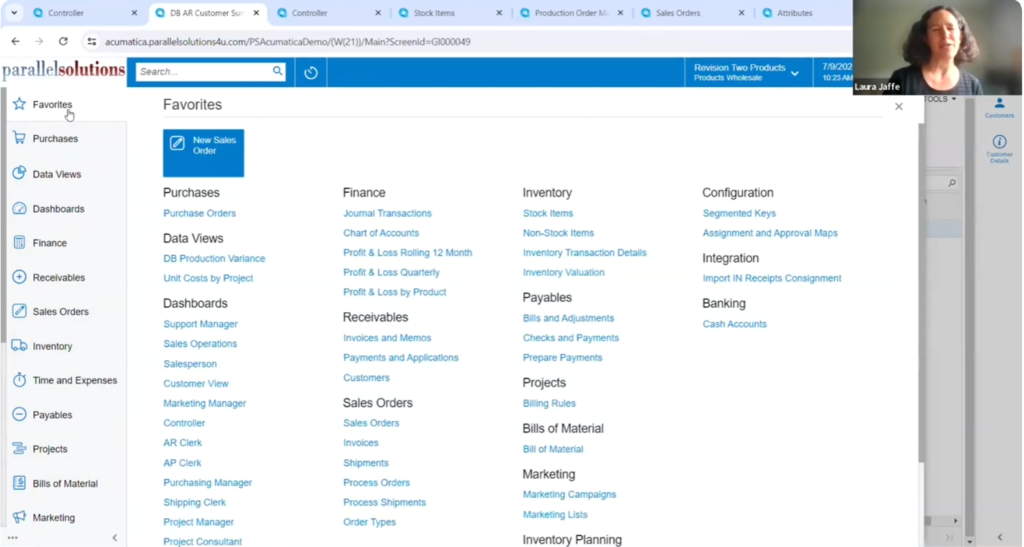
Acumatica’s universal search functionality sits at the top of every screen, letting you search across menu items, transactions, master data, and even help documentation—all from a single search box. Need to find a specific resin type? Type the item number or description and Acumatica instantly shows you the stock item, along with any transactions, purchase orders, or production orders that reference it.
The system also maintains a favorites menu that each user can customize. When you’re constantly accessing stock items, production orders, or material requirements planning screens, you can star these items and they’ll appear in your personal favorites list. No more hunting through menus—your most-used functions are always just one click away.
Every screen includes context-sensitive help accessible via the question mark icon, so when you’re setting up lot tracking or configuring a new item class, the information you need is always readily available.
Organizing Inventory with Item Classes
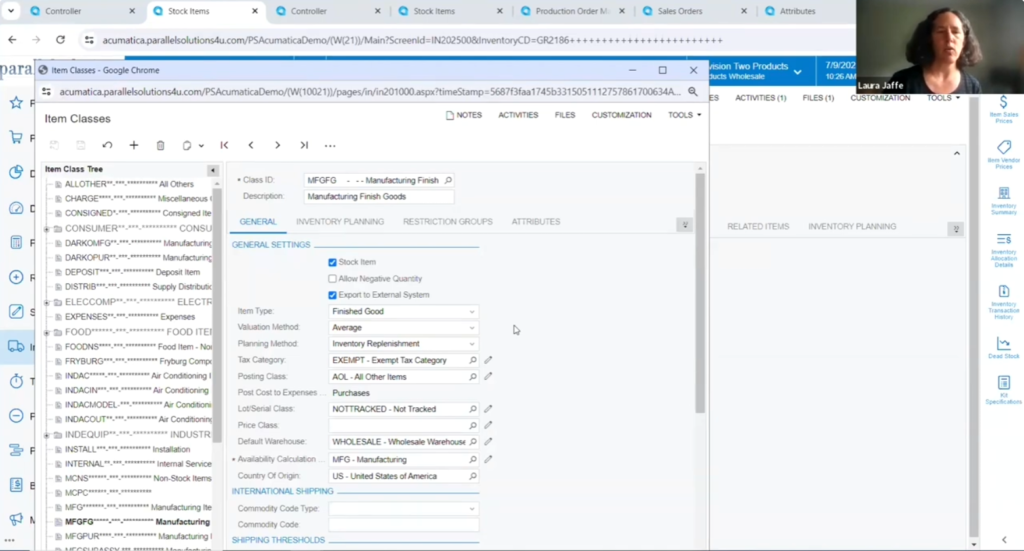
Item classes let you define default settings for groups of similar items, making it incredibly easy to create new inventory items without repeatedly configuring the same parameters. For plastics manufacturers, you might create separate item classes for finished goods, raw resins, colorants, additives, regrind materials, and packaging.
When you create a new finished good, selecting the “Finished Goods” item class automatically populates appropriate defaults—perhaps standard cost valuation, lot tracking enabled, and MRP planning. For raw materials, you might default to FIFO valuation and simple min/max replenishment. These defaults can always be overridden for specific items, but they eliminate repetitive data entry and ensure consistency.
The item class structure also makes customization and configuration much more manageable. When you want to add custom attributes or fields, you can associate them with specific item classes so they only appear where relevant.
Valuation Methods: Tracking True Product Costs
Accurate cost tracking is critical in plastics manufacturing, where material costs fluctuate and regrind recovery impacts profitability. Acumatica supports multiple valuation methods that can be mixed and matched across your inventory:
Standard Cost: Ideal for finished goods where you want to track variances between planned and actual costs. The system maintains both current and pending standard costs with controlled workflows for updates.
Moving Average: Perfect for raw materials where purchase prices change frequently. The system automatically recalculates average cost with each receipt.
FIFO (First In, First Out): Essential when you need to match specific costs with specific sales, ensuring accurate gross margin calculations.
Specific/Actual Cost: Critical for lot-tracked items where each lot has a unique cost that must be tracked individually.
The valuation method can be set at the item class level and overridden for individual items as needed—use standard cost for finished goods while tracking raw resins on moving average.
Lot and Serial Tracking: Complete Traceability
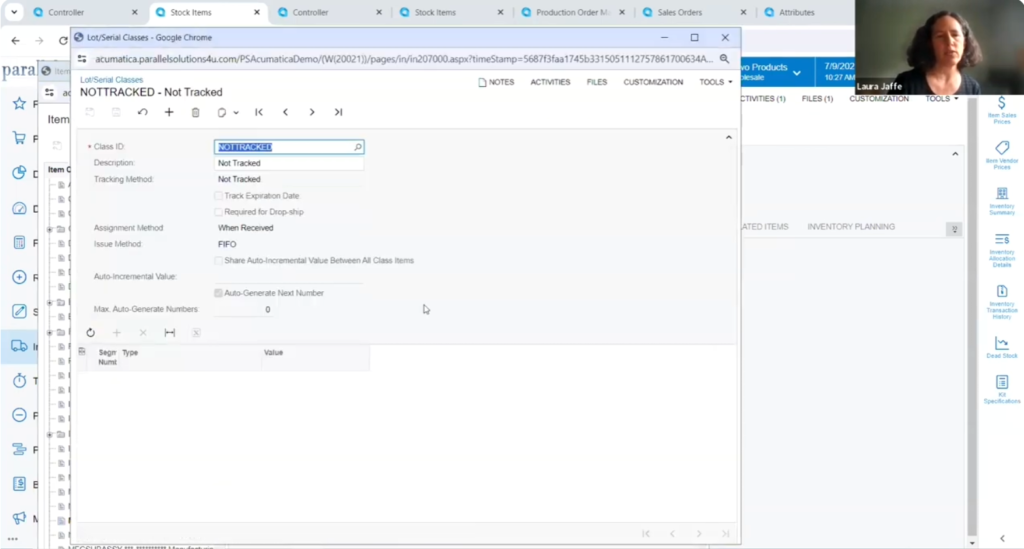
For plastics manufacturers, lot tracking isn’t optional—it’s essential for quality control, customer requirements, and regulatory compliance. Acumatica’s lot and serial number tracking provides the traceability you need while remaining flexible enough to adapt to different requirements across your product lines.
Lot/serial classes control critical settings like when lot numbers are assigned (upon receipt, when issued to production, or when finished goods are completed), numbering format (auto-generated with date stamps or manual entry), expiration date tracking for shelf life management, and whether tracking is required or optional.
The system supports multiple lot tracking methods within the same transaction. You can receive lot-tracked raw materials and non-lot-tracked packaging in the same purchase order receipt, with the system guiding users to provide lot information only where required.
Custom Attributes: Tracking What Matters
Beyond standard fields, plastics manufacturers often need to track industry-specific information. Acumatica’s attribute system provides unlimited flexibility to capture any data points your business requires—drop-down lists for standardized values like color or grade, text fields for specifications, numeric values for measurements, or date fields for certifications.
Once defined, attributes integrate throughout Acumatica. They can be associated with specific item classes, included in generic inquiries and reports for filtering, copied to sales orders and invoices for customer documentation, and used in searches to quickly locate items with specific characteristics.
For example, you might create a “Color” attribute for finished goods and a “Resin Grade” attribute for raw materials. These attributes appear as columns alongside standard fields, making it easy to filter to all blue items or all materials of a specific grade.
Multi-Vendor Management and Cross References
Acumatica supports multiple vendors per stock item, with vendor-specific lead times, preferred vendor designation, vendor part numbers, and pricing. When the MRP system suggests purchase orders, it can automatically select the preferred vendor based on lead time, cost, or other criteria.
The cross-reference system handles the reality that a single product might be known by different numbers throughout its lifecycle—your supplier’s part number, your internal number, customer part numbers, and barcodes. These cross references work throughout the system, automatically resolving to the correct inventory item whether you’re creating purchase orders, processing sales orders, or scanning in the warehouse.
Multi-Warehouse and Location Management
As plastics manufacturers grow, managing inventory across multiple facilities becomes critical. Each warehouse can have its own configuration for accounting, replenishment parameters, item availability, and default locations. The MRP system can automatically suggest transfers between warehouses when one location is short while another has excess inventory.
Within each warehouse, you can define specific bins and locations for organized storage. Locations can be configured with allowed item types, picking priority, item costs, and capacity limits. The warehouse management system uses location information to direct workers during picking and put-away operations, minimizing travel time and reducing errors.
Planning Methods: From Simple to Sophisticated
Different materials require different planning approaches. Acumatica supports multiple planning methods:
MRP (Material Requirements Planning): Time-phased planning that considers current inventory, scheduled receipts, production orders, and sales orders to suggest precisely when to order or produce items.
Min/Max Replenishment: Simple inventory replenishment based on minimum and maximum stock levels—perfect for fast-moving commodities with short lead times.
You can mix these methods throughout your inventory. Raw resins might use MRP to coordinate with production schedules, while packaging materials use min/max replenishment.
File Attachments and Documentation
Acumatica stores all files in the central database, making technical documentation accessible anywhere you have browser access. For inventory items, you might attach certificates of analysis, safety data sheets, product specifications, standard operating procedures, or photos.
When your quality manager needs to verify a resin specification, they can pull up the stock item on their tablet in the warehouse and immediately access the supplier’s certificate. This centralized document storage eliminates the filing cabinets and network drives that make finding documentation frustrating.
Automation and Real-Time Intelligence
Throughout Acumatica, clock icons indicate automation opportunities where manual tasks can be scheduled to run automatically—running MRP every morning, generating cycle count schedules, emailing reports, or updating standard costs on schedule.
Acumatica also provides powerful inquiry and reporting capabilities that help you understand what’s happening in your operations. Generic inquiries let you create custom views of your data without programming: Which items haven’t moved in 90 days? What’s our current inventory value by product line? Which lots are approaching expiration?
Integration with Manufacturing Operations
While this article focuses on inventory management, it’s important to understand how inventory integrates with Acumatica’s manufacturing capabilities. Bills of material automatically pull component information from inventory items. Production orders consume raw materials from inventory and receive finished goods back. The MRP system coordinates material planning with production schedules.
This integration means your inventory accuracy directly impacts production planning accuracy. When lot tracking is configured properly, you maintain complete traceability from raw material lot through production batch to finished goods—exactly what quality audits and customer requirements demand.
Why Industry-Specific Functionality Matters
Generic inventory systems try to serve every industry, which means they serve no industry particularly well. Acumatica’s focus on manufacturing and distribution means the inventory features you need are built into the core system rather than requiring expensive customizations.
For plastics manufacturers, this translates to lot tracking that handles supplier lots, production lots, and finished goods lots seamlessly; valuation methods that support regrind recovery and byproduct tracking; multi-warehouse functionality that coordinates material transfers with production schedules; and attribute systems flexible enough to track resin grades, colors, certifications, and any other properties your business requires.
Companies that have transformed their operations with Acumatica consistently report that having industry-appropriate functionality from day one accelerates implementation and improves adoption.
Taking the Next Step
Inventory management might not be the most exciting aspect of running a plastics manufacturing business, but it’s foundational to everything else you do. When inventory information is accurate, accessible, and integrated with production and financial systems, your entire operation runs more smoothly.
Parallel Solutions specializes in helping plastics manufacturers implement and optimize Acumatica. We understand both the technology and the unique requirements of the plastics industry, ensuring you get a solution that works the way your business works rather than forcing you to adapt to software limitations.
Ready to see how Acumatica’s inventory management can transform your operations? Let’s start with a conversation about your specific challenges and goals.