
Intuit has been quietly sunsetting QuickBooks Desktop — and for manufacturing and distribution companies, the clock is running. If your operations, reporting, and team workflows are built around QuickBooks Desktop, this is not a software preference conversation. It is a timing decision that has real consequences if you wait too long.
What “QuickBooks Desktop Discontinued” Actually Means
Intuit has been systematically pulling back support for QuickBooks Desktop. Older versions have already lost access to payroll updates, bank feeds, and live customer support. Intuit stopped selling new Desktop Pro Plus and Premier Plus subscriptions to U.S. customers in September 2024, and Desktop 2024 is the last version that will ever be released. You are not locked out overnight, but the runway ends in 2027 at the latest.
The companies most exposed right now are the ones who stayed on QuickBooks Desktop precisely because it worked. They built workflows around it, accumulated years of data, and now have to decide what comes next.
What Desktop Did That Online Never Matched
This is worth saying clearly: QuickBooks Desktop was genuinely more capable than QuickBooks Online for manufacturing and distribution companies. The Desktop version had stronger inventory management, more nuanced job costing, better reporting flexibility, and tighter handling of complex multi-location scenarios.
Manufacturers who have been on Desktop for a decade are not just resistant to change. Many chose it because it actually handled their operational complexity better. The concern that QuickBooks Online cannot replicate what they have is real, and not unreasonable.
Which brings us to the actual question: if you are being pushed off QuickBooks Desktop, where do you land?
Three Paths Forward for Manufacturing Companies
Option 1: Move to QuickBooks Online
This is the path Intuit wants you to take. For smaller, simpler operations, it may be sufficient. But manufacturers with job costing needs, multi-warehouse inventory, or production tracking will often find it frustrating. It is a different product, not an upgrade.
Option 2: Stay on an Older Desktop Version
Some companies keep running their existing installation. This works until it does not. You retain functionality short term, but take on compounding risk: no security updates, no support, and eventual incompatibility with newer operating systems.
Option 3: Move to an ERP Built for Manufacturing
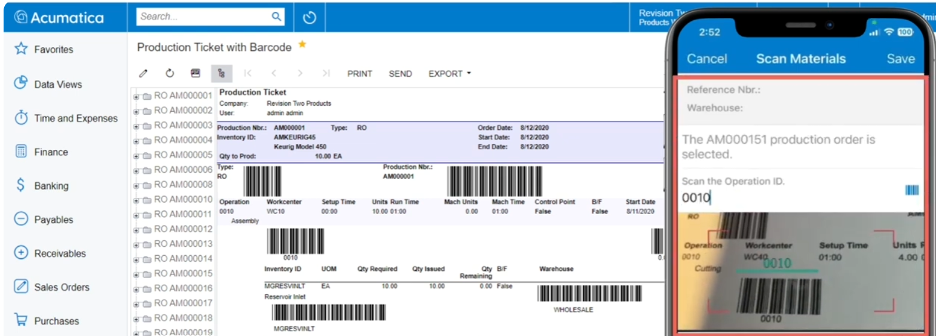
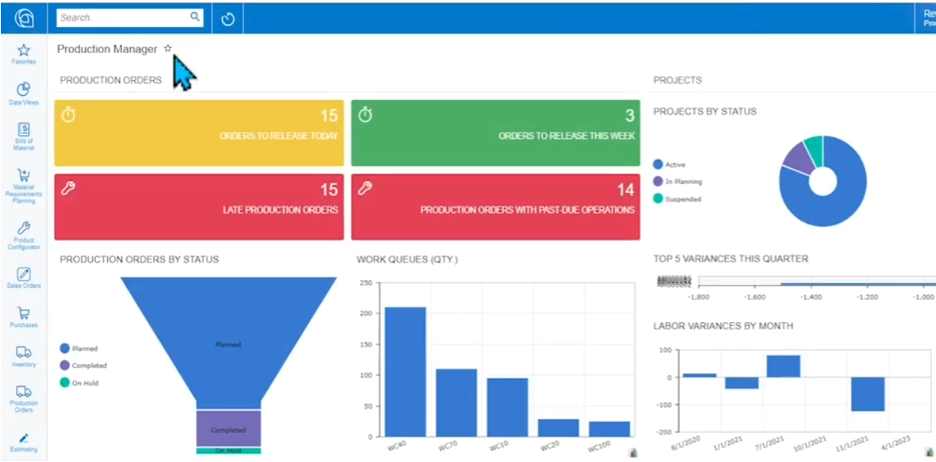
For companies that have genuinely outgrown accounting software, this is the moment to make that move. An ERP built for manufacturing does what QuickBooks Desktop was never designed to do: connect your financials to your shop floor, manage production orders, track actual versus standard costs, handle multi-warehouse inventory, and give you visibility across the whole operation.
Parallel Solutions works with the Acumatica Manufacturing Edition, and what we see consistently is that companies who waited to move off QuickBooks Desktop wish they had done it sooner, not because Desktop was bad, but because the gap between what they needed and what they had was costing them more than they realized.
Why the Timing of This Decision Matters
There is a real temptation to delay. You are busy. The software still runs. But waiting carries real cost.
Migrating while Desktop still functions is significantly easier than migrating after something breaks. You have clean data, time to evaluate properly, and can run a thoughtful implementation instead of a rushed one.
The longer you stay on aging software, the more your processes calcify around its limitations. Companies often discover, when they finally evaluate an ERP, that they have built workarounds they stopped seeing as workarounds. A planned migration fixes those things. A forced one usually does not.
And if your competitors are making this move, the operational visibility gap is going to grow. The Deloitte 2026 Manufacturing Industry Outlook is direct on this: targeted investments in digital tools are increasingly essential for manufacturers to maintain a competitive edge. QuickBooks Desktop, even at its best, was an accounting tool. Modern manufacturing operations need more than that.
Key Takeaways
- QuickBooks Desktop discontinued support is already affecting older versions, with the path forward narrowing each year.
- QuickBooks Online is not a direct replacement for manufacturers. It has meaningful capability gaps compared to the Desktop product.
- Staying on aging Desktop software creates compounding risk: no security patches, no support, and eventual operating system incompatibility.
- For manufacturing and distribution companies, this is a natural inflection point to evaluate whether an ERP built for your industry is the right next step.
- A planned migration is always better than a forced one. Starting the evaluation process now, while you still have runway, gives you options.
Frequently Asked Questions
Is QuickBooks Desktop being discontinued completely?
Intuit has discontinued support for older versions of QuickBooks Desktop and has been redirecting investment toward QuickBooks Online. While some Desktop products remain available for purchase, the long-term direction is clear: Intuit is sunsetting the Desktop line. Existing installations continue to run, but users lose access to connected services, security updates, and live support over time.
Can I just switch to QuickBooks Online instead of an ERP?
For simple businesses, QuickBooks Online may be sufficient. For manufacturers, the more relevant question is whether it handles job costing, production orders, multi-warehouse inventory, and operational reporting at the depth your business needs. Many manufacturers who evaluate QuickBooks Online find it falls short of what they had with Desktop, let alone what they need to grow. It is worth a careful assessment before assuming it solves the problem.
How long does an ERP implementation take for a manufacturer?
Implementation timelines vary based on company size, complexity, and how prepared the business is going in. For mid-sized manufacturers, a well-run Acumatica Cloud ERP implementation typically runs three to six months. Starting early, before you are under pressure from Desktop, gives you time to do it right.
Related Reading
If you are evaluating your options, these resources may help: Acumatica Cloud ERP overview and Acumatica Distribution Edition for companies also managing distribution operations.
What Are You Waiting For?
If your company is still on QuickBooks Desktop, now is the right time to have that conversation about what comes next. Not because the sky is falling, but because making a deliberate choice on your timeline will always turn out better than being forced into one.
What has kept your company on QuickBooks Desktop this long? And what would it take for you to feel ready to evaluate something built for a manufacturer? We would genuinely like to hear where you are in that thinking. Contact us and let us know.
Parallel Solutions is an Acumatica Cloud ERP implementation partner based in Warrensville Heights, Ohio, serving manufacturers and distributors across the United States. We specialize in Acumatica Manufacturing Edition and Acumatica Distribution Edition, helping mid-market companies replace outdated accounting software and disconnected systems with a unified platform built for operational growth. For more information, visit parallelsolutions4u.com.