

Last Updated: July 2026 | By Mary Jo O’Neill, Principal & CFO, Parallel Solutions
I was talking with a plant manager a few weeks ago who described his company’s QuickBooks setup with a phrase I have heard more times than I can count: “It works, but everything else is somewhere else.”
His financials were in QuickBooks. His bill of materials was in a spreadsheet. His production schedule lived in a shared Google doc that three people updated manually. His WIP costs were, in his words, “basically a guess until the job closed.”
His company had grown from four employees to thirty-eight in six years. QuickBooks had not grown with them. The QuickBooks manufacturing limitations his team ran into were not obvious at first. They built quietly, one workaround at a time, until the spreadsheets and the manual processes were costing more time than anyone wanted to admit.
If any of that sounds familiar, this post is for you.
Key Takeaways
- QuickBooks Desktop supports only single-level BOMs with no revision control, forcing manufacturers to maintain true product structures in spreadsheets.
- WIP inventory disappears from your balance sheet the moment materials are pulled for a production run and does not reappear until the job closes.
- Multi-location inventory tracking in QuickBooks relies on manual workarounds that degrade in accuracy as your operation grows.
- QuickBooks has no production scheduling It cannot see your work center capacity, labor availability, or lead times.
- These QuickBooks manufacturing limitations are invisible when your operation is small and compounding when it is not.
Where QuickBooks Manufacturing Limitations First Appear
QuickBooks is genuinely good at what it was built for: bookkeeping, invoicing, payroll, accounts payable and receivable. For a small manufacturer in its early years, that is often enough.
The problem is not that QuickBooks fails immediately. The gaps are invisible when your operation is simple and only become visible once your complexity grows past the point where you can manage them manually. That transition point is different for every company, but the pain points almost always show up in the same four places.
BOM Limitations: Single-Level Is Not Manufacturing
QuickBooks Desktop has an assemblies feature that lets you define a list of components going into a finished item. For a company making a single, simple product, that is serviceable.
Real manufacturing BOMs are multi-level. A finished machine might contain a sub-assembly that itself contains three components, one of which is another sub-assembly. QuickBooks cannot model that structure. You end up flattening everything into a single-level list, which means your BOM in QuickBooks is a rough approximation of your actual product structure, not an accurate representation of how it is built.
There is also no revision control. If engineering changes a component specification, you are manually updating a spreadsheet and hoping the production team gets the memo. No version history, no effectivity dating, no way to manage engineering change orders inside the system.
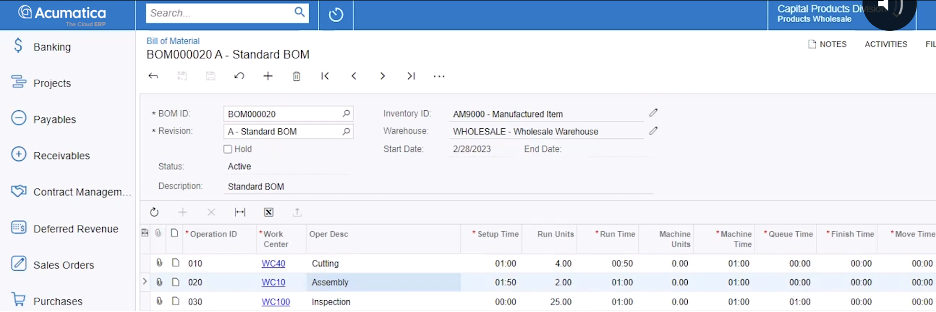
Acumatica Cloud ERP’s Bill of Materials and Routing module handles multi-level BOMs natively, with revision control, phantom items, and cost rollups that flow from sub-assemblies up to the finished good.
WIP Tracking: The Inventory That Goes Missing
Here is one of the most damaging QuickBooks manufacturing limitations, and one of the least discussed. When you pull components from inventory and start a production run, QuickBooks treats those materials as gone. They are no longer in raw materials inventory. They are not yet in finished goods. They simply disappear from your balance sheet until the build is recorded as complete.
That means your inventory values are wrong during every active production run. Your cost of goods is a guess until the job closes. Your financial statements do not reflect the true state of your operation at any given point in time.
For a company running one or two production jobs at a time, that is manageable. For a company running fifteen simultaneous jobs across multiple product lines, it is a serious problem. You cannot make sound purchasing decisions, capacity decisions, or profitability decisions when a significant portion of your inventory is unaccounted for.
True WIP tracking requires a system that can cost materials, labor, and overhead to a production order in real time and reflect that value on your balance sheet as work in process throughout the entire production cycle, not just when the job closes. QuickBooks does not do this.
Multi-Location Inventory: Where the Spreadsheets Multiply
Most manufacturers eventually end up with inventory in more than one place: a main warehouse, a secondary storage location, a staging area on the floor, maybe an off-site facility. QuickBooks has basic location tracking in its higher tiers, but it was not designed for manufacturing inventory movements.
What manufacturers and distributors actually need is the ability to issue materials from a specific bin to a specific production order, track materials in transit between locations, manage minimum stock levels by location, and know in real time what is on hand, committed to production, and available to promise.
In QuickBooks, multi-location inventory requires workarounds. Most of them involve spreadsheets. And spreadsheets mean manual entry, which means errors, which means your inventory counts drift further from reality the longer you run the business.
Production Scheduling: The Gap QuickBooks Cannot Fill
QuickBooks has no production scheduling capability. It does not know your work centers, your machine capacity, your labor hours, or your lead times. It cannot generate a production schedule, flag a capacity constraint, or tell you whether you can realistically commit to a customer delivery date.
Most manufacturers running QuickBooks handle scheduling in one of two ways: a separate tool that does not connect to their accounting system, or a shared spreadsheet that someone updates manually every morning. When that stops working, it usually produces late orders, unhappy customers, and hours of manual rework.
When a customer calls and asks whether you can deliver 500 units by the end of the month, the answer should come directly from your system. QuickBooks has no capacity visibility to provide it. Tying financial data to production capacity is one of the core things manufacturing-specific ERP systems are built to do, and one of the core QuickBooks manufacturing limitations that no workaround fully solves.
What This Looks Like Once You Move Off QuickBooks
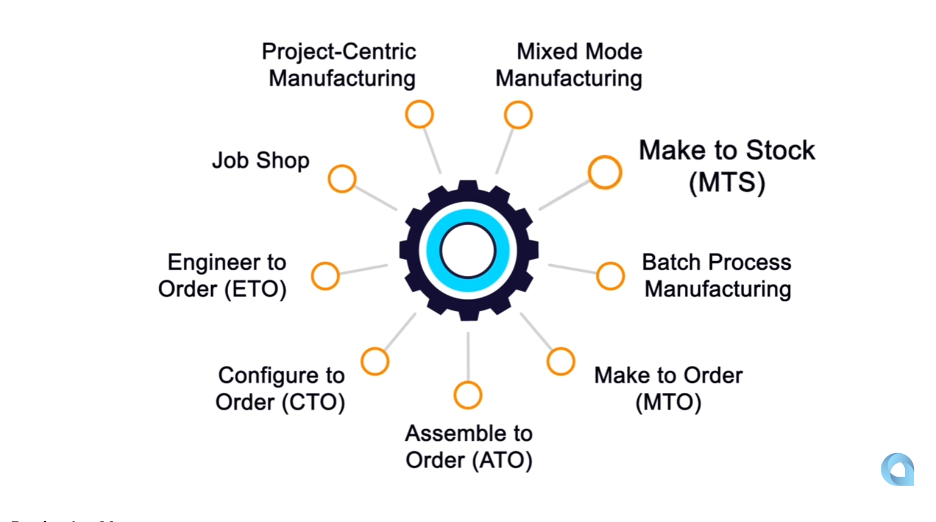
The manufacturers we work with who move from QuickBooks to Acumatica Cloud ERP typically describe the same experience. The first few months are about getting accurate data: real BOMs, real inventory positions, real WIP values. The second few months are about using that data to make decisions they could not make before, including tighter delivery commitments, better purchasing timing, and actual job profitability instead of end-of-month estimates.
According to the Deloitte 2026 Manufacturing Industry Outlook, 80% of manufacturing executives plan to invest 20% or more of their improvement budgets in smart manufacturing tools. Manufacturers staying on QuickBooks are working against that trend. QuickBooks was not designed to connect production data, scheduling, and financial reporting in a single system, and bridging those gaps with integrations adds complexity a purpose-built ERP eliminates by design.
Frequently Asked Questions
Does QuickBooks have any manufacturing capabilities at all?
QuickBooks Desktop has a basic assemblies feature that supports single-level bills of materials and simple build transactions. QuickBooks Online has no native BOM functionality. Neither version supports multi-level BOMs, production scheduling, work order management, WIP tracking, or MRP. For very simple manufacturing, the Desktop assemblies feature can serve as a starting point, but most manufacturers outgrow it quickly.
What is the difference between QuickBooks assemblies and a real BOM?
A QuickBooks assembly is a flat list of components that go into a finished item. A real BOM is a hierarchical structure that includes sub-assemblies, phantom items, revision history, effectivity dates, and routing steps tied to specific operations. QuickBooks assemblies work for simple single-level products. They cannot model the actual structure of most manufactured goods.
At what point should a manufacturer look beyond QuickBooks?
There is no single trigger, but the most common signals are: your team is maintaining a separate spreadsheet for BOMs or scheduling, your inventory values are frequently wrong, you cannot tell which jobs are profitable, or your production schedule lives outside your accounting system. If more than two of those are true, the gap is already costing you money.
Read Next
Before evaluating your next step, it is worth understanding the broader timeline: QuickBooks Desktop Discontinued: What Manufacturers Must Do covers what Intuit’s end-of-life roadmap means for companies still on Desktop.
Still Running Production Out of a Spreadsheet?
If your BOM is in Excel, your schedule is in a shared doc, and your WIP costs are a moving target, you are not alone. Most manufacturers in that situation have simply grown faster than their software. The question is not whether QuickBooks is to blame. It is whether the workarounds are still working for you.
What is the biggest gap you are running into right now? We work with manufacturers in exactly this situation. Contact us and let us know what you are dealing with.
Parallel Solutions is an Acumatica Cloud ERP implementation partner based in Warrensville Heights, Ohio, serving manufacturers and distributors across the United States. We specialize in Acumatica Manufacturing Edition, helping mid-market manufacturers replace disconnected systems with a unified platform built for how production actually works. For more information, visit parallelsolutions4u.com.