
Published: June 2026 | Last Updated: June 2026 | Category: Acumatica Manufacturing
The Acumatica product configurator is one of the most capable — and most underestimated — tools in Acumatica Manufacturing Edition. Many manufacturers assume ERP configurators are simple drop-down menus. The reality is a rules-based engine that drives a unique bill of materials, calculates dimensional quantities, validates option compatibility in real time, and flows directly into the production order without any manual re-entry.
This post explains what the configurator does at each stage of the configure-to-order workflow, what makes it different from basic option selection, and what manufacturers should understand before implementing it.
What the Acumatica Product Configurator Actually Does
The Acumatica product configurator is a rules-based configuration engine built directly into Acumatica Manufacturing Edition. It allows manufacturers to define features, options, attributes, and calculation formulas that automatically generate a unique bill of materials and production routing for every configured item — all tied to the sales order, with no re-entry between order entry and the shop floor.
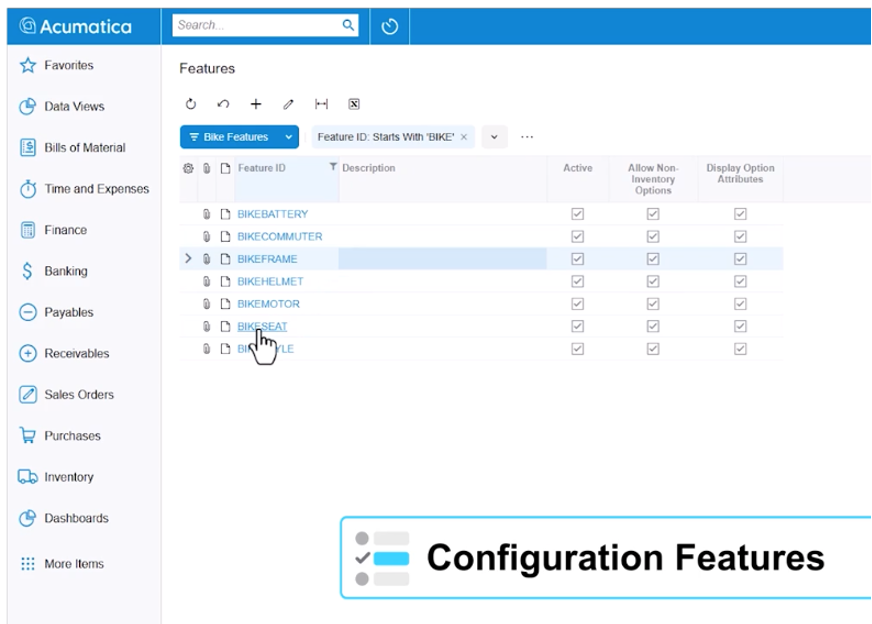
The configurator is built around four core elements: features, options, attributes, and formulas that together make up a unique bill of materials for every configured item.
Features are the categories of choices a user makes during order entry — things like material type, finish, component style, or size range. Options are the selections within each feature. Attributes are either questions the user answers (such as entering a custom dimension) or calculated values the system derives automatically (such as total area from length times width). Rules then govern how all of those interact.
If a customer selects a specific finish, only compatible color options remain available. If they enter a dimension outside a valid range, the system catches it before the order moves forward. The rule-based validation fires in real time and provides a plain-language explanation of what does not match and why — not a generic error code.
For example, when a user selects an attribute value that conflicts with a previously selected option, a clear message appears identifying the mismatch. The order cannot proceed until it is resolved. This prevents specification errors from ever reaching the production floor.
Dimensional Calculations and Formula-Driven Bill of Materials’
One of the most common pain points for manufacturers of dimensional or custom products is getting accurate material quantities out of every order. When every product has a different size, manual cross-referencing between the sales order and the bill of materials is slow, error-prone, and completely avoidable.
The Acumatica product configurator handles this through calculated attributes and formulas. When an order entry person enters a length and a width, the system automatically calculates area and uses that derived value to determine the required material quantity on the bill of materials. No spreadsheet. No separate calculation step. No handwritten note to the shop.
Those calculated values flow directly to the production order. The shop floor receives not just what was ordered, but the specific cut lengths, material quantities per operation, and any additional derived values such as machine program file references or weight calculations. For manufacturers whose production requires passing specification data to CNC equipment or other automated processes, this means the shop is always working from a system-generated specification — not an interpretation of the sales order.
From Sales Order to Production Order Without Data Re-Entry
When a configuration is complete, generating the production order is a single step. The system builds the bill of materials based on every selection made — including materials tied to hidden features, such as standard hardware components that are automatically calculated per unit of measure. The production order carries all of the attribute answers, quantities, and routing operations.
The configurator is the front end of the configure-to-order manufacturing workflow. Everything downstream — materials planning, work center scheduling, cost capture, and shipment — follows directly from what is set up at configuration. Our post on Acumatica’s manufacturing workflow from sales order to shipment walks through how that full downstream flow works once the production order is generated.
Configuration Keys: Faster Repeat Orders with Fewer Errors
For manufacturers who build similar products for the same customer repeatedly — with small variations from order to order — re-entering a full configuration each time creates two problems: it takes longer than necessary, and it introduces opportunities for error when someone misremembers a detail from a prior order.
The Acumatica product configurator addresses this with configuration keys. A configuration key is an identifier that saves a completed configuration as a reusable starting point. When a repeat order comes in, the order entry person pulls up the previous configuration key, and the system pre-populates all of the options. They can accept the configuration as-is or modify individual attributes. A process that previously required cross-referencing a prior order and re-entering every field can be done in a few clicks.
Configuration keys are also searchable by key value, which means if a customer calls two years later to reorder, the original configuration is accessible and retrievable — not buried in a paper file or a spreadsheet that may no longer exist.
Not Just for True Configure-to-Order Scenarios
A question that often surprises people: the Acumatica product configurator is not limited to scenarios where every product is completely unique. Many manufacturers of standard products still use configurator logic to generate accurate production instructions and routing details for each order variation — without requiring a unique finished goods SKU for every possible combination.
If your products have standard part numbers but variable production parameters, the configurator can apply the same formula-driven, rules-validated workflow to define those parameters at order entry. The shop floor gets complete production instructions generated from the order, not from someone’s memory of how a particular variant is built.
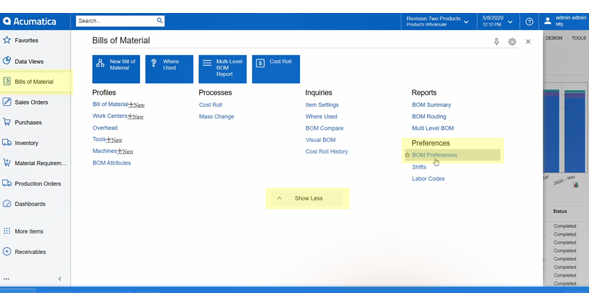
Understanding how your bill of materials is structured is important before configuring this logic. Our post on setting up bill of materials preferences in Acumatica is a good starting point if you are newer to how Acumatica manages BOM structure and revision control.
E-Commerce and External System Integration
For manufacturers whose orders originate through a website or an external quoting tool, Acumatica exposes product configurator logic through web API endpoints. An e-commerce storefront can use the same rules, options, and validations that live inside the ERP rather than running a separate configuration engine that has to be manually reconciled with production.
Pricing can flow in from the external system, or the configurator can calculate price based on the components included in the configured BOM. Either way, the configuration entered on the website and the production order generated inside Acumatica are built from the same rules — which eliminates the mismatch between what was quoted externally and what the shop is told to build.
What to Know Before Implementing the Acumatica Product Configurator
The configurator is capable of handling significant complexity: dozens of features, interdependent rules, dimensional formulas, multi-operation routings, and historical configuration lookup. The implementation work is in mapping your actual product rules into the system correctly.
That means documenting the dependencies between your options, understanding which combinations are valid and which are not, and testing configurations against real order scenarios before going live. For manufacturers whose current process involves a lot of tribal knowledge — where the right combination of options lives in a person’s head rather than in a written specification — this mapping step surfaces that knowledge and makes it systematic.
The investment in getting the configuration setup right pays back quickly in reduced order errors, faster production starts, and cleaner shop floor documentation. Manufacturers who implement carefully typically see the biggest gains in order entry time, error rates on the production floor, and the speed with which new employees can enter complex orders correctly.
Frequently Asked Questions About the Acumatica Product Configurator
What is the Acumatica product configurator?
The Acumatica product configurator is a rules-based configuration engine built into Acumatica Manufacturing Edition. It allows manufacturers to define features, options, attributes, and calculation formulas that automatically generate a unique bill of materials and production routing for every configured item — without manual re-entry between the sales order and the shop floor.
What types of manufacturers benefit from the Acumatica product configurator?
The configurator is designed for configure-to-order and make-to-order manufacturers who build products with variable dimensions, customer-selected options, or interdependent specifications. It is also useful for manufacturers of standard products who need rules-based logic to generate accurate production instructions for each order variation.
Can the Acumatica product configurator handle dimensional calculations?
Yes. The configurator supports calculated attributes and formulas. When an order entry person enters dimensions such as length and width, the system automatically calculates derived values like area and uses those to determine material quantities on the bill of materials. Those calculated values flow directly to the production order and shop floor documentation.
Does the configurator validate option combinations in real time?
Yes. Configuration rules govern how selections interact. If a customer selects an option that conflicts with another attribute, the system displays a plain-language error message before the order moves forward. This prevents mismatched specifications from reaching the production floor.
Can previous configurations be reused for repeat orders?
Yes. The Acumatica product configurator supports configuration keys, which save a completed configuration as a reusable starting point. On a repeat or similar order, the order entry person loads the previous configuration key, reviews the pre-populated options, and modifies only what has changed.
Does the Acumatica product configurator integrate with e-commerce systems?
Yes. Acumatica exposes product configurator logic through web API endpoints, allowing e-commerce storefronts and external quoting tools to use the same rules, options, and validations that live inside the ERP. Pricing can flow in from the website or be calculated based on the configured bill of materials components.
Is the Acumatica product configurator only for fully custom products?
No. While the configurator is commonly associated with configure-to-order manufacturing, it is also used by manufacturers of standard products who need rules-based logic to generate accurate production parameters and routing instructions for each order variation — without creating a unique SKU for every combination.
About Parallel Solutions and the Acumatica Product Configurator
Parallel Solutions is an Acumatica Cloud ERP implementation partner based in Warrensville Heights, Ohio, serving manufacturers and distributors across the United States. Parallel Solutions specializes in Acumatica Manufacturing Edition, including configure-to-order workflows, bill of materials setup, production order management, and shop floor integration.
The Acumatica product configurator is a module within Acumatica Manufacturing Edition that enables rules-based configuration of complex or custom products at the point of order entry. Parallel Solutions has implemented the Acumatica product configurator for manufacturers of dimensional products, custom assemblies, and standard products requiring production-specific routing instructions.
For more information, visit parallelsolutions4u.com or contact the team at 440-498-9920.
What does your current configure-to-order process look like, and where does the biggest breakdown occur between order entry and the shop floor? We would enjoy hearing about it.
Contact us to talk through your configuration challenges.