
Last Updated: September 2026
Key Takeaways
- The configurator is a rules-based engine in Acumatica Manufacturing Edition that generates a unique BOM and routing for every configured item.
- Real-time validation shows plain-language messages that stop specification errors before they reach the shop floor.
- Calculated attributes and formulas derive material quantities from the dimensions entered at order entry.
- Configuration keys save completed configurations, so repeat orders take a few clicks, even years later.
- Web API endpoints let e-commerce and quoting tools use the same rules as the ERP.
- Most implementation effort goes into mapping product rules and tribal knowledge into the system.
The Acumatica product configurator works by turning order-entry selections into a unique bill of materials and production routing. The order entry person selects features and options and enters attributes such as dimensions. The configurator applies rules to validate each choice in real time and formulas to calculate material quantities. When the configuration is complete, one step generates the production order, with no re-entry between the sales order and the shop floor. It’s built into Acumatica Manufacturing Edition and supports both configure-to-order and standard products.
The Acumatica product configurator is one of the most capable and most underestimated tools in Acumatica Manufacturing Edition. Many manufacturers assume ERP configurators are simple drop-down menus. The reality is a rules-based engine that drives a unique bill of materials, calculates dimensional quantities, validates option compatibility in real time, and flows directly into the production order without any manual re-entry.
This post explains what the configurator does at each stage of the configure-to-order workflow, what makes it different from basic option selection, and what manufacturers should understand before implementing it.
What Does the Acumatica Product Configurator Do?
The Acumatica product configurator is a rules-based configuration engine built directly into Acumatica Manufacturing Edition. It allows manufacturers to define features, options, attributes, and calculation formulas that automatically generate a unique bill of materials and production routing for every configured item all tied to the sales order, with no re-entry between order entry and the shop floor.
The configurator is built around five core elements: features, options, attributes, rules, and formulas that together make up a unique bill of materials for every configured item.
The Acumatica product configurator is built on five building blocks that work together at order entry.
| Building block | What it is | Example |
|---|---|---|
| Features | Categories of choices made at order entry | Material type, finish, size range |
| Options | Selections within each feature | A specific finish or component style |
| Attributes | Questions the user answers, or values the system calculates | Custom dimension entered; area calculated from length × width |
| Rules | Logic that governs how selections interact | Only compatible colors appear once a finish is chosen |
| Formulas | Calculations that turn attributes into BOM quantities | Material quantity derived from the calculated area |
Features are the categories of choices a user makes during order entry, things like material type, finish, component style, or size range. Options are the selections within each feature. Attributes are either questions the user answers (such as entering a custom dimension) or calculated values the system derives automatically (such as total area from length times width). Rules then govern how all of those interact.
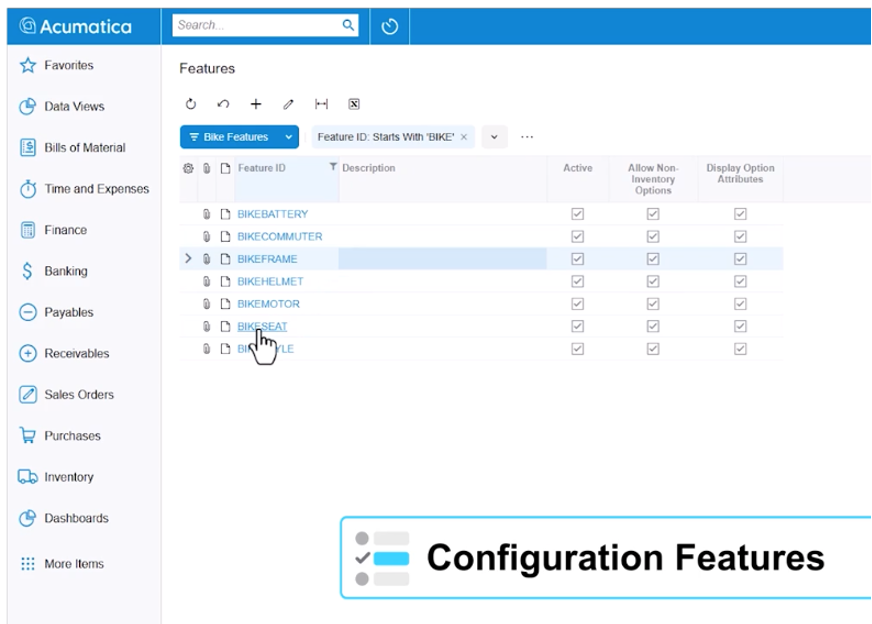
If a customer selects a specific finish, only compatible color options remain available. If they enter a dimension outside a valid range, the system catches it before the order moves forward. The rule-based validation fires in real time and provides a plain-language explanation of what does not match and why, not a generic error code.
For example, when a user selects an attribute value that conflicts with a previously selected option, a clear message appears identifying the mismatch. The order cannot proceed until it is resolved. This prevents specification errors from ever reaching the production floor.
How Does the Configurator Calculate Dimensions and Material Quantities?
One of the most common pain points for manufacturers of dimensional or custom products is getting accurate material quantities out of every order. When every product has a different size, manual cross-referencing between the sales order and the bill of materials is slow, error-prone, and completely avoidable.
The Acumatica product configurator handles this through calculated attributes and formulas. When an order entry person enters a length and a width, the system automatically calculates area and uses that derived value to determine the required material quantity on the bill of materials. No spreadsheet. No separate calculation step. No handwritten note to the shop.
Those calculated values flow directly to the production order. The shop floor receives not just what was ordered, but the specific cut lengths, material quantities per operation, and any additional derived values such as machine program file references or weight calculations. For manufacturers whose production requires passing specification data to CNC equipment or other automated processes, this means the shop is always working from a system-generated specification, not an interpretation of the sales order.
A Worked Example: Configuring a Custom Stair Tread in the Acumatica Product Configurator
The Acumatica product configurator makes more sense once you watch one order go through it. Take a hardwood flooring manufacturer that sells custom stair treads. Every order is a little different, and the old process looks familiar: a salesperson writes the specs on a quote, someone in engineering turns them into a cut list, and the shop builds from whatever made it to the floor.
Here is how the same order works in the configurator, step by step.
Features and options. The configured item has three features. Species has options for red oak, white oak and hickory. Finish is either unfinished or prefinished. Edge profile is either bullnose or square. The customer’s choices decide which raw materials and operations end up on the order.
Attributes. The salesperson enters width, depth and quantity as attributes. The configurator checks each value against a minimum and maximum, so a tread too deep for the available lumber gets flagged before the quote goes out.
Formulas. A calculated attribute works out board footage from the dimensions (thickness × width × length ÷ 144). That number sets the lumber quantity on the bill of materials, so nobody does the math by hand.
Rules. A rule limits which finishes are available for certain species. Another rule adds a finishing operation to the routing only when prefinished is selected. If the salesperson picks a combination the shop can’t produce, the configurator stops them and says why.
The result. When the order is saved, Acumatica creates a production order with a unique bill of materials and routing for that exact tread: the right species, the right board footage and the right operations. The shop floor builds from a system-generated spec, not someone’s reading of a sales note.
How Does a Configured Sales Order Become a Production Order?
When a configuration is complete, generating the production order is a single step. The system builds the bill of materials based on every selection made including materials tied to hidden features, such as standard hardware components that are automatically calculated per unit of measure. The production order carries all of the attribute answers, quantities, and routing operations.
The configurator is the front end of the configure-to-order manufacturing workflow. Everything downstream, materials planning, work center scheduling, cost capture, and shipment follows directly from what is set up at configuration. Our post on Acumatica’s manufacturing workflow from sales order to shipment walks through how that full downstream flow works once the production order is generated.
How Does the Configurator Compare to Manual Order Entry?
Six order-to-production tasks change when the configurator replaces manual order entry.
| Task | Manual order entry | With the Acumatica product configurator |
|---|---|---|
| Checking option compatibility | Depends on what the order entry person knows; errors surface on the shop floor | Rules validate every choice in real time, with plain-language messages |
| Calculating material quantities | Spreadsheets and cross-referencing | Formulas calculate quantities from the entered dimensions |
| Creating the production order | Re-keyed from the sales order | Generated in one step with BOM, routing, and attributes |
| Shop floor instructions | Someone’s interpretation of the sales order | System-generated specs, including cut lengths and CNC program references |
| Repeat orders | Find the prior order and re-enter every field | Load the configuration key and change only what differs |
| Web and external orders | A separate configurator, reconciled by hand | Same rules through web API endpoints |
How Do Configuration Keys Speed Up Repeat Orders?
For manufacturers who build similar products for the same customer repeatedly with small variations from order to order, re-entering a full configuration each time creates two problems: it takes longer than necessary, and it introduces opportunities for error when someone misremembers a detail from a prior order.
The Acumatica product configurator addresses this with configuration keys. A configuration key is an identifier that saves a completed configuration as a reusable starting point. When a repeat order comes in, the order entry person pulls up the previous configuration key, and the system pre-populates all of the options. They can accept the configuration as-is or modify individual attributes. A process that previously required cross-referencing a prior order and re-entering every field can be done in a few clicks.
Configuration keys are also searchable by key value, which means if a customer calls two years later to reorder, the original configuration is accessible and retrievable, not buried in a paper file or a spreadsheet that may no longer exist.
Pricing, Quotes, and Configure-to-Stock in the Acumatica Product Configurator
Most discussions of the Acumatica product configurator stop at the bill of materials. Four other capabilities matter just as much to the people selling and quoting configured products.
Flexible pricing methods. The configurator supports several ways to price a configured item. You can set a fixed price for the parent item, roll up prices from the selected options, use cost-plus pricing based on the configured components, or calculate based on order multiples. Manufacturers with simple catalogs usually start with a fixed price. Shops with wide variation in material cost tend to use rolled-up or cost-plus pricing so margin holds up as specs change.
Configuring from CRM opportunities and quotes. Sales teams can configure items right on a CRM opportunity. The quote is built with the same rules the shop floor relies on, and when the quote converts, the configured item moves to the sales order with no re-entry. Reps can’t promise a combination production can’t build.
Configure-to-order and configure-to-stock. Configure-to-order builds a specific item for a specific customer order. Configure-to-stock uses the same rules to produce common configurations ahead of demand for inventory. That works for manufacturers who see the same handful of combinations over and over and want them on the shelf before the orders arrive.
Order history lookup. The configurator can pull up the configurations a customer ordered before. When a repeat customer calls, the rep finds the last order, starts from that setup and changes only what’s different.
Can Manufacturers of Standard Products Use the Configurator?
A question that often surprises people: the Acumatica product configurator is not limited to scenarios where every product is completely unique. Many manufacturers of standard products still use configurator logic to generate accurate production instructions and routing details for each order variation, without requiring a unique finished goods SKU for every possible combination.
If your products have standard part numbers but variable production parameters, the configurator can apply the same formula-driven, rules-validated workflow to define those parameters at order entry. The shop floor gets complete production instructions generated from the order, not from someone’s memory of how a particular variant is built.
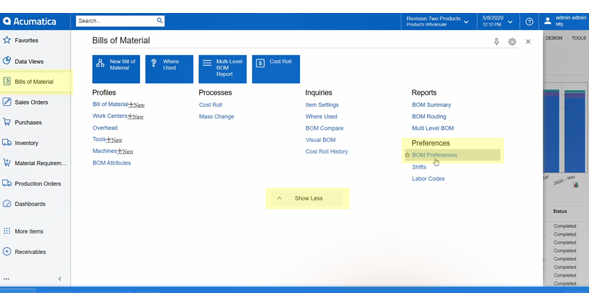
Understanding how your bill of materials is structured is important before configuring this logic. Our post on setting up bill of materials preferences in Acumatica is a good starting point if you are newer to how Acumatica manages BOM structure and revision control.
Does the Configurator Work with E-Commerce and External System?
For manufacturers whose orders originate through a website or an external quoting tool, Acumatica exposes product configurator logic through web API endpoints. An e-commerce storefront can use the same rules, options, and validations that live inside the ERP rather than running a separate configuration engine that has to be manually reconciled with production.
Pricing can flow in from the external system, or the configurator can calculate price based on the components included in the configured BOM. Either way, the configuration entered on the website and the production order generated inside Acumatica are built from the same rules which eliminates the mismatch between what was quoted externally and what the shop is told to build.
Lessons From Implementing the Acumatica Product Configurator
The software isn’t usually the hard part. The hard part is getting product knowledge out of people’s heads and into rules the system can enforce. These six lessons separate smooth configurator projects from painful ones.
Start with order history, not the catalog. Pull the last 12 to 24 months of orders and look at which combinations customers bought. Build rules for those first. Exotic combinations that sold once in five years can come later, or stay as manual exceptions.
Write the rules in plain language before building anything. A statement like “hickory is never sold prefinished in widths over 12 inches” should be agreed on by sales, engineering and production before anyone enters it into Acumatica. Disagreements show up here, where they’re cheap to fix.
Pilot one product family. Pick a line with real volume and real variation and get it working from quote to production order. What you learn there shapes how the rest of the catalog gets built.
Test against orders you’ve already built. Run past orders through the configurator and compare the BOM and routing it generates with what the shop built. Every mismatch is either a missing rule or an undocumented shop-floor habit, and both are worth finding before go-live.
Assign ownership of the rules. Products change. Someone has to own configurator maintenance when a new option is added or a material is discontinued. Without an owner, the rules drift and people start working around the system again.
Don’t configure everything. Standard items with fixed specs should stay standard items. The configurator is for products where variation creates errors and re-entry, not for every SKU.
Parallel Solutions helps manufacturers map product rules, build and test configurator logic, and connect it to production and shop floor workflows in Acumatica Manufacturing Edition. If your product rules still live in spreadsheets or in one engineer’s memory, talk with our team about where to start.
Read next: From Sales Order to Shipment: A Complete Walk-Through of Acumatica Manufacturing Workflow
Frequently Asked Questions About the Acumatica Product Configurator
What is the Acumatica product configurator?
The Acumatica product configurator is a rules-based configuration engine built into Acumatica Manufacturing Edition. It allows manufacturers to define features, options, attributes, and calculation formulas that automatically generate a unique bill of materials and production routing for every configured item without manual re-entry between the sales order and the shop floor.
What types of manufacturers benefit from the Acumatica product configurator?
The configurator is designed for configure-to-order and make-to-order manufacturers who build products with variable dimensions, customer-selected options, or interdependent specifications. It is also useful for manufacturers of standard products who need rules-based logic to generate accurate production instructions for each order variation.
Can the Acumatica product configurator handle dimensional calculations?
Yes. The configurator supports calculated attributes and formulas. When an order entry person enters dimensions such as length and width, the system automatically calculates derived values like area and uses those to determine material quantities on the bill of materials. Those calculated values flow directly to the production order and shop floor documentation.
Does the configurator validate option combinations in real time?
Yes. Configuration rules govern how selections interact. If a customer selects an option that conflicts with another attribute, the system displays a plain-language error message before the order moves forward. This prevents mismatched specifications from reaching the production floor.
Can previous configurations be reused for repeat orders?
Yes. The Acumatica product configurator supports configuration keys, which save a completed configuration as a reusable starting point. On a repeat or similar order, the order entry person loads the previous configuration key, reviews the pre-populated options, and modifies only what has changed.
Does the Acumatica product configurator integrate with e-commerce systems?
Yes. Acumatica exposes product configurator logic through web API endpoints, allowing e-commerce storefronts and external quoting tools to use the same rules, options, and validations that live inside the ERP. Pricing can flow in from the website or be calculated based on the configured bill of materials components.
Is the Acumatica product configurator only for fully custom products?
No. While the configurator is commonly associated with configure-to-order manufacturing, it is also used by manufacturers of standard products who need rules-based logic to generate accurate production parameters and routing instructions for each order variation without creating a unique SKU for every combination.
What pricing methods does the Acumatica product configurator support?
It supports fixed parent pricing, rolled-up option pricing, cost-plus pricing based on configured components, and pricing based on order multiples.
Can sales reps configure products from a CRM opportunity in Acumatica?
Yes. Reps can configure items on a CRM opportunity using the same rules as production, and the configuration moves to the sales order when the quote converts.
About Parallel Solutions and the Acumatica Product Configurator
Parallel Solutions is an Acumatica Cloud ERP implementation partner based in Warrensville Heights, Ohio, (outside of Cleveland) serving manufacturers and distributors across the United States. Parallel Solutions specializes in Acumatica Manufacturing Edition, including configure-to-order workflows, bill of materials setup, production order management, and shop floor integration.
The Acumatica product configurator is a module within Acumatica Manufacturing Edition that enables rules-based configuration of complex or custom products at the point of order entry. Parallel Solutions has implemented the Acumatica product configurator for manufacturers of dimensional products, custom assemblies, and standard products requiring production-specific routing instructions.
What does your current configure-to-order process look like, and where does the biggest breakdown occur between order entry and the shop floor? Contact us to talk through your configuration challenges.